Every business has its own way of working, and off-the-shelf tools rarely fit just right. Microsoft Power Apps helps you build custom business applications that align perfectly with your processes – without needing to write code.
At Netwise, we specialize in delivering advanced Model-driven Apps that are tightly integrated with your data and business logic. These apps are built on Microsoft Dataverse, ensuring scalable, secure, and structured solutions that support even the most complex enterprise workflows.
Empower business users to create and manage apps using intuitive, code-free interfaces.
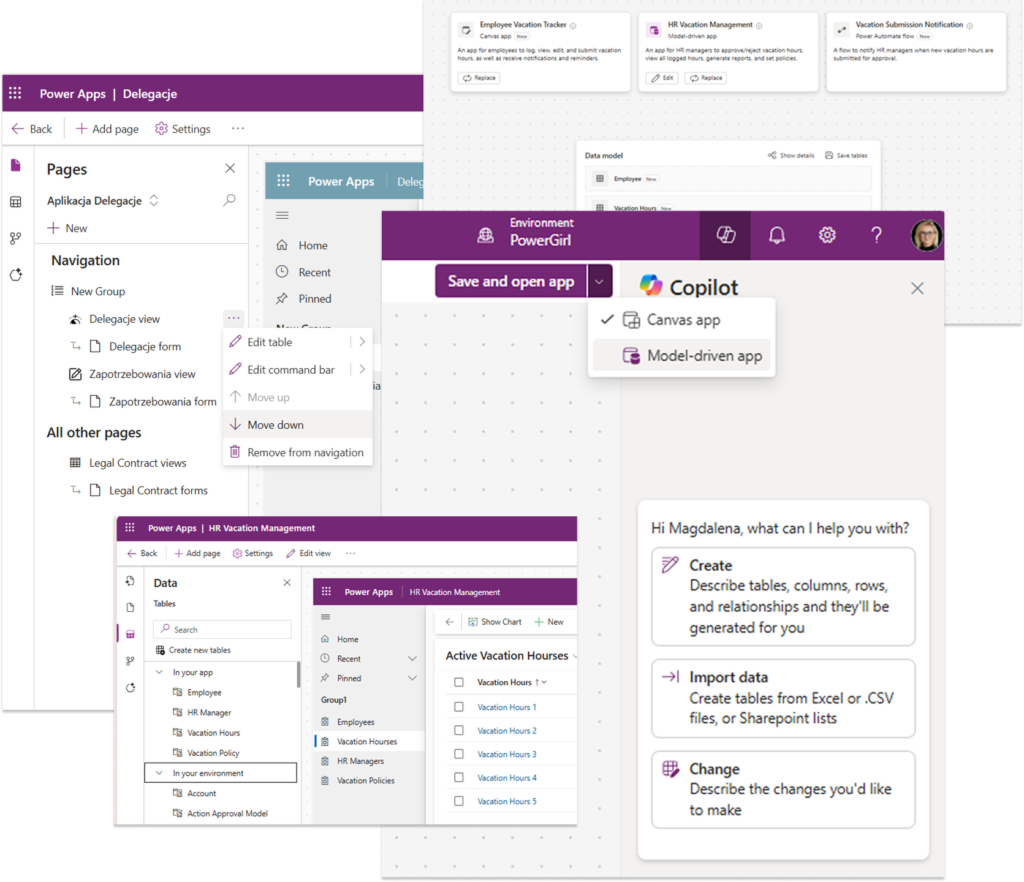
Model-driven Apps
Agile deployment
Publish apps to web, iOS, Android, and Windows. Access enterprise tools anywhere, anytime.
Canvas Apps
Design pixel-perfect, highly customizable apps from scratch. Use drag-and-drop controls and connect to any data source for rapid app creation.
Data integration
Flexible low-code
Easier implementation of internal policies and external regulations.
Power Apps Component Framework (PCF)
Choosing the right partner is key to success. At Netwise, we provide:
Two Microsoft MVPs on board, bringing top-tier product insight and early access to platform innovations
Extensive experience delivering low-code and Dynamics 365-based apps across industries
Deep knowledge of Microsoft’s Power Platform ecosystem and integrations
Strategic consulting aligned to your business needs and processes
Power Apps is a tool from Microsoft that lets you build simple business apps without needing to code much.
You can use it to create things like forms, approval apps, or internal tools and connect them to data like Excel, SharePoint, or Dataverse.
A Canvas app is a type of Power Apps app where you build the entire interface yourself, starting from a blank screen. You control exactly how it looks and how users interact with it – placing buttons, forms, galleries, and defining logic using simple formulas (similar to Excel).
Unlike model-driven apps, Canvas apps are focused on the user experience first. You connect them to different data sources (like SharePoint, Excel, SQL, or Dataverse) and decide how that data is displayed and edited in the app.
In model-driven apps, you create forms in the Power Apps maker portal by selecting a table and opening its form designer. You can add fields, sections, and tabs to define how the data is structured and displayed.
Then you customize the form by arranging fields, setting properties (like required or read-only), and controlling visibility. You can also add business rules or logic to change how the form behaves based on data.
Most of the time, you build apps directly in Power Apps Studio in the browser – that’s your main tool. If you need more advanced stuff, you can use things like Visual Studio Code or Power Platform CLI, especially for custom components or managing environments.
On top of that, you have Dataverse for data, Power Automate for workflows, and resources like Microsoft Learn or XRM Toolbox that just make your life easier.
Power Apps works with Power Automate by letting you trigger flows directly from the app, for example when a user clicks a button or submits a form.
When that happens, the app sends data (like form inputs or selected items) to the flow, which then runs in the background and can do things like update data, send emails, or connect to other systems. If needed, it can also return a result back to the app.
So in practice, Power Apps is what the user interacts with, and Power Automate handles the logic and actions behind it.

Yes, and that’s one of its biggest strengths. It works very naturally with services like SharePoint, Excel, Teams, Outlook, and Dataverse. At the same time, it can also integrate with external systems, like APIs, SQL databases, or tools outside Microsoft, using connectors or custom integrations.
So you’re not limited to Microsoft only – it works best there, but you can connect it to pretty much anything.
Standard is already included in Microsoft 365 and works well for simple apps based on tools like SharePoint or Excel.
Premium (~$20/user/month) is needed when you want to use Dataverse, connect to external systems (like SQL or APIs), or build more advanced apps.
In short: standard is fine for basic scenarios, Premium is for more serious, business-critical solutions.
Microsoft Power Apps offers a simple way to build and run business apps on top of your data.
Main features:
It’s mainly about turning manual processes into lightweight, easy-to-manage apps.