Home / Solutions / Microsoft Foundry

Build AI Apps & Agents with Microsoft Foundry

Create, customize, and operationalize enterprise-grade AI apps and agents at scale – securely, responsibly, and cost‑effectively – on the platform trusted by the world’s most innovative organizations. 

Solve the barriers to enterprise AI adoption

Fragmented AI slows delivery?

Bring models, agents, governance, and observability into one platform.

Pilots don't scale easily?

Apply enterprise-grade controls like RBAC, policies, monitoring, and security integration.

AI lacks business context?

Connect it to enterprise data to deliver contextual, reliable outputs.

Chatbots aren't enough?

Enable multi-step processes, system actions, and collaboration across tools.

Scale increases risk and cost?

Ensure visibility across performance, usage, and cost to stay in control.

Build, connect, and run AI across your business

Accelerate time to value

Reduce friction between experimentation and production by combining infrastructure, tools, and governance in one platform. 

Choose the right model for each use case

Get access to more than 11,000 models, including foundational, open, reasoning, multimodal, and industry-specific models, along with benchmarking.

Connect AI to enterprise systems
Start building connected AI today, integrating your systems via Logic Apps and 1,400+ connectors like SAP, Salesforce, and Dynamics 365.
Build agents that do more than answer

Enable the creation of action-oriented, context-aware agents that can support real business processes.

Ground AI in enterprise knowledge
Connect AI apps and agents to enterprise data and content sources so responses are more relevant, contextual, and reliable.

Scale with governance built-in

Centralize AI asset management, includes monitoring, evaluations, policy controls, Entra ID integration, and Microsoft Defender-related governance capabilities.

What you gain with Microsoft Foundry

Up to 1–1.5 months faster AI delivery
Azure AI services shorten time‑to‑market with streamlined integration, monitoring, and deployment workflows.

10–25% more
developer productivity

Boost organizational efficiency as AI tools reduce manual work and free people to focus on value‑driving tasks.
27% fewer security breaches
Strengthen trust and reduce compliance exposure with built‑in guardrails, identity governance, and AI‑powered threat detection.

How Microsoft Foundry works

Foundry Models
Access a broad model ecosystem, compare options, fine-tune selected models, and use routing to optimize quality and cost across use cases.
Foundry Agent Service and Frameworks
Design, orchestrate, and host intelligent agents using Microsoft’s services and common frameworks such as LangChain, CrewAI, and LlamaIndex.

Foundry IQ

Connect agents to enterprise and web knowledge sources to improve relevance, grounding, and answer quality in real business scenarios.

Foundry tools and integrations

Add capabilities such as OCR, translation, speech, document intelligence, business-system connectivity, and your own APIs or MCP tools.
Observability, trust and controls
Monitor application performance, trace behavior, run evaluations, and apply security, identity, and governance controls across your AI solutions.

Deployment and expansions

Publish and scale solutions across environments, including integrations with Microsoft 365, Teams, BizChat, and containerized deployment options where applicable.

Example use cases for Microsoft Foundry

Enterprise Knowledge Assistant
Help employees find answers faster across policies, documentation, and internal content with AI grounded on enterprise knowledge sources through Foundry IQ.

Customer Service Agent Assist

Support service teams with response suggestions, case summaries, knowledge retrieval, and connected workflows across customer systems.
Sales Proposal Automation
Accelerate proposal and RFP creation by combining approved content, internal knowledge, and AI-assisted drafting in a governed environment.

Document Processing Workflows

Extract, classify, validate, and route information from documents using AI tools and workflow orchestration.

CRM and Operations Copilot

Embed AI into core systems to help users navigate records, summarize context, and take action faster across business workflows.

Multi-Agent Process Automation

Coordinate multiple agents across tasks, tools, and enterprise systems to automate more complex operational workflows.

Why Netwise

Proven expertise and a solid track record (300+ platforms delivered) in implementing complex Microsoft  solutions for large enterprises.

Two Microsoft MVPs on board, bringing top-tier product insight and early access to platform innovations.
We’re not afraid to challenge requirements, ask hard questions or propose a different approach if it leads to better outcomes.
Commitment to excellence and client satisfaction as demonstrated by our seven Partner of the Year awards and multiple other accolades.
Adrian, Chief Delivery Officer. At Netwise since 2010.
What Azure + AI changed for our clients

Microsoft Foundry is a set of Azure tools for teams that want to build and run AI systems in real business environments. It lets developers choose AI models, connect them to company data and systems, and run them reliably without building everything from scratch. It also gives IT teams one place to control access, track usage, and see how AI systems behave in production.

Copilot Studio is a low‑code tool for quickly building internal or customer‑facing copilots, mainly inside Microsoft 365 (Teams, SharePoint, web), with most infrastructure and limits handled by Microsoft. It’s suited to department‑level assistants, Q&A bots, and simple process automation where speed matters more than customization.

Microsoft Foundry is a developer platform that runs in your Azure subscription and gives full control over models, agent behavior, integrations, scaling, and monitoring. It’s used when an AI solution needs to be deeply integrated into business systems, run at scale, and be treated like a real application, not just a conversational interface

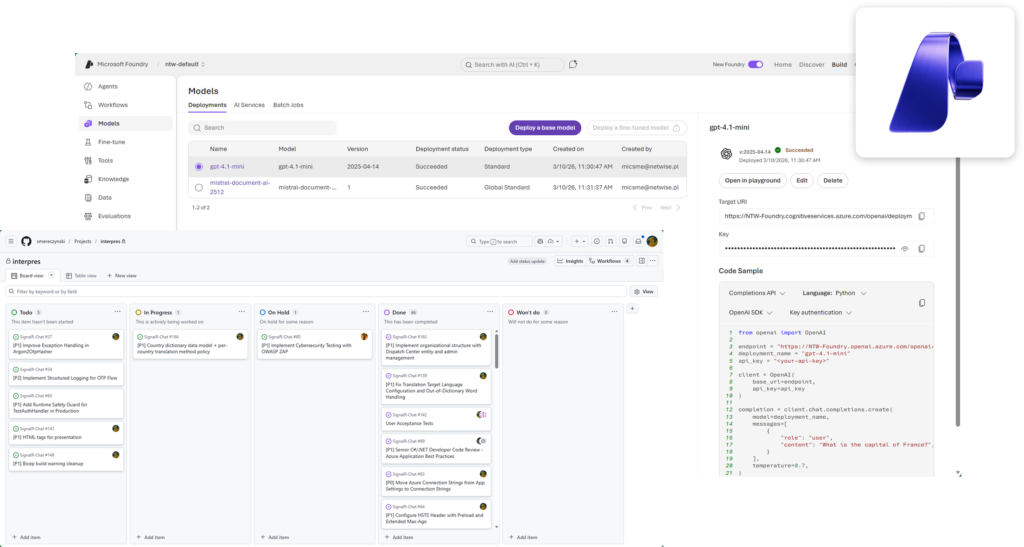
No. While it includes SDKs and developer tooling, Microsoft positions Foundry as a platform for enterprise AI operations, model builders, and application development teams working together in one governed environment.
You can get started with Microsoft Foundry by signing in to the Foundry portal at ai.azure.com using your Azure account and creating a Foundry project, which is used to organize models, agents, and resources. Microsoft provides step‑by‑step Microsoft Learn training that covers the basics of the Foundry portal, SDKs, and project setup. From there, you can deploy models, build AI agents, and manage security and monitoring within the same platform.
  1. An Azure subscription where Foundry resources can be created and billed. Foundry runs inside your Azure environment, not as a standalone SaaS tool.
  2. Microsoft Entra ID (Azure AD) set up for your team, with basic role assignments (admins, developers, users). Foundry relies on Entra ID for access control and governance.
  3. A basic Azure environment plan: resource groups, regions, and security decisions (public vs private access, data isolation). This doesn’t have to be complex at first, but it must exist.
  4. Developer capability (or a partner): Foundry is not low‑code. You need people who can work with APIs, SDKs, and Azure services to build and run AI solutions. This is implied by Microsoft positioning Foundry as a developer and platform‑engineering tool. 

Ready to build AI apps and agents that reach production?