Home / Solutions / Copilot Studio

Copilot Studio

Empower every team with AI-driven copilots and agents.

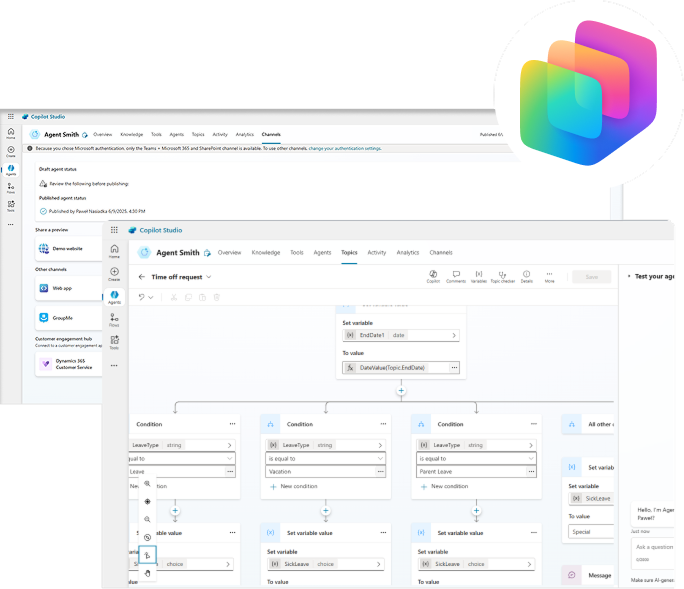
Copilot Studio gives you the tools to create, manage, and deploy intelligent assistants tailored to your organization’s needs – all without writing code.
Take the next step: evolve from traditional bots to autonomous agents that proactively act on business signals, make decisions in real time, and adapt without human intervention.
Address key automation and communication pain points

Overwhelmed by routine inquiries?

Design low-code copilots and agents that handle FAQs and repetitive tasks – instantly and 24/7

Disconnected business tools?

Integrate your copilots with Microsoft 365, Dynamics, and over 1200 connectors for unified workflows and smart data access.​

Inconsistent service quality?

Create standardized, intelligent responses and workflows that maintain accuracy across channels.​

Need to personalize at scale?

Leverage real-time data and natural language understanding to adapt replies and recommendations based on user context.​

What you can build with Copilot Studio

Customer support copilots

Resolve common questions instantly, guide users step-by-step, and escalate issues only when needed. Improve satisfaction while reducing support workload.

Internal helpdesk & AI assistants

Automate password resets, troubleshoot common issues, track tickets, and provide 24/7 support. Let IT teams focus on strategic work instead of routine tasks.

HR & employee services agents

Build assistants that manage leave requests, onboarding processes, policy lookups, training recommendations, and employee FAQs — all in natural conversation.

Sales & marketing copilots

Connect to Dynamics 365 and CRM systems to surface insights, qualify leads, trigger workflows, generate proposals, and personalize content for prospects.

Operations & process automation agents

Create autonomous agents that monitor signals, trigger workflows, update systems, and take actions without waiting for human prompts — ideal for logistics, procurement, compliance checks, and more.

Finance & approvals automation

Accelerate invoice processing, approvals, budget requests, and reporting by combining AI understanding with Power Automate workflows and secure data access.

Accelerate business outcomes with copilots and agents

Faster response times

Handle thousands of inquiries instantly with agents that never sleep​

Increased efficiency

Automate repetitive processes and free up time for strategic tasks​

Enhanced customer experience

Deliver consistent, accurate, and helpful answers across channels​

Scalable innovation

Deploy copilots and agents across regions, teams, and languages without increasing headcount​

Reimagine business automation with Copilot Studio

Low-code bot and agent building

Design and launch conversational experiences through a visual interface – no development experience needed. Drag, drop, test, and go live in hours.

Natural conversation flows

Power engaging conversations with AI that understands user intent, adapts in real time, and supports multiple languages with built-in translation.

Seamless Microsoft integration

Embed copilots into Teams, Outlook, Dynamics 365, and Power Apps – or any channel your users rely on.

Real-time insights & monitoring

Track usage, performance, and satisfaction with real-time analytics dashboards. Continuously improve experiences with data-driven refinements.

Built-in AI capabilities

Use pre-integrated GPT models and Microsoft Azure AI to generate content, summarize data, and automate user interactions at scale.

Autonomous agent readiness

Modernize operations with agents that act proactively, make data-driven decisions, adapt in real time, and automate complex workflows like IT support, HR approvals, and claims.

Implement Copilot Studio with experts

Choosing the right partner is key to success. At Netwise, we provide:

Two Microsoft MVPs on board, bringing top-tier product insight and early access to platform innovations

Deep experience in deploying AI solutions and Power Platform for enterprises

Business-first approach focused on ROI and adoption ​

Proven methodology and best practices from award-winning implementations ​
Kamil, Value Delivery Manager. Check his expertise on our Blog
Discover the possibilities with Copilot Studio

Ready to bring AI copilots into your organization?

Azure AI Studio is a development environment mainly used by developers and data scientists to build and deploy AI applications in Azure. It allows them to work directly with AI models, connect enterprise data, create prompt flows, use retrieval-augmented generation (RAG), and integrate AI solutions with other systems and APIs. It is typically used for custom AI applications and more advanced AI workflows.

Copilot Studio is a low-code platform for creating conversational copilots and agents, especially within Microsoft 365, Dynamics 365, and Power Platform. It allows teams to quickly build AI assistants that answer questions, automate tasks, and connect to business data and applications.

In short: Azure AI Studio is used to build custom AI solutions with more technical control, while Copilot Studio focuses on quick creation of enterprise copilots and conversational agents.

It depends on what you want to achieve.

If you want ready-to-use AI inside apps like Word, Excel, Outlook, or Teams, Microsoft Copilot for Microsoft 365 is the better choice. It’s built directly into the tools users work with every day and improves productivity immediately.

If you want to create your own custom copilots, automate specific processes, or connect to your own data sources, Copilot Studio is the better option. It allows you to design and extend AI experiences tailored to your organization.

The main features of Copilot Studio for creating bots are:

  • Low‑code / no‑code builder – Visual authoring with drag‑and‑drop topics and dialog nodes, plus natural‑language agent creation, so non‑developers can build bots quickly.
  • Generative AI orchestration – Bots can dynamically decide which topics, tools, or knowledge sources to use at runtime, enabling more natural and flexible conversations than rule‑based bots.
  • Topics and conversation flows – Structured topics define how the bot handles specific intents, while still allowing AI‑assisted topic creation and adaptive flows.
  • Knowledge grounding – Bots can generate answers based on trusted sources such as SharePoint, OneDrive, Dataverse, and websites, ensuring responses stay aligned with enterprise data.
  • Actions and automation – Integration with Power Automate, connectors, and APIs allows bots to perform real tasks like creating tickets, updating records, or triggering workflows.
  • Multi‑channel deployment – Publish bots to Microsoft Teams, websites, Power Pages, and embedded app experiences from a single build.
  • Security and governance – Enterprise‑grade security, RBAC, DLP policies, analytics, and compliance inherited from Microsoft Power Platform.

Copilot bots stand out from traditional chatbots because they go beyond fixed scripts and predefined decision trees. Instead of only following structured conversation paths, they use generative AI to understand user intent more naturally and respond in a more contextual way.

They are also deeply integrated with Microsoft 365, Dynamics 365, and the Power Platform, which means they can access business data, trigger workflows, and support real processes – not just answer questions.

In short, Copilot bots are designed to be intelligent assistants embedded in everyday work, rather than standalone chat tools.

Yes, but not directly out of the box.

Copilot Studio doesn’t provide native connectors specifically for platforms like Reddit or YouTube. However, you can integrate with them indirectly using APIs, custom connectors, or Power Automate.

A common pattern is: Reddit/YouTube → webhook or scheduled trigger → Power Automate → Copilot Studio action.
This allows Copilot to respond to events or provide AI‑generated insights.

In short: Copilot Studio can support Reddit and YouTube workflows, but it cannot act as a native chatbot on those platforms.

Key best practices for developing and deploying Copilots bots include:

  • Use generative AI for open‑ended questions, but rely on structured topics and guided flows for critical or transactional tasks.
  • Connect bots to approved sources like SharePoint, Dataverse, or curated websites to reduce hallucinations and keep answers current.
  • Use Power Automate and connectors to turn conversations into outcomes (create records, trigger workflows), but keep actions auditable and secure.
  • Test with real user queries, edge cases, and fallback scenarios. Review analytics to identify failed topics and unclear responses.
  • Roll out in phases (pilot → broader audience), gather feedback, and refine before scaling.
  • Use RBAC, DLP policies, environment separation, and audit logs to ensure compliance and safe enterprise use.

The Copilot Studio viral trial (sometimes called the free or self‑service trial) is designed for individual experimentation and light testing, not production use. How to participate:

  • Use a work or school account. Personal Microsoft accounts aren’t supported. Sign‑up requires a Microsoft 365 tenant where self‑service trials are allowed.
  • Sign up via Copilot Studio. Go to copilotstudio.microsoft.com and start the trial. The trial typically lasts 30 days and can sometimes be extended once.
  • Start building agents immediately. You can create, test, and configure Copilot Studio agents, including generative responses, topics, and actions. Testing is done through the built‑in test chat.

During the Copilot Studio trial (including the viral/free trial), users can explore core capabilities, but with important constraints designed to prevent production use. Key limitations include:

  • Trial duration – The trial typically lasts 30 days and may be extendable once. After expiration, access is reduced unless a paid license is added.
  • Very strict usage limits – Trial environments enforce low request quotas (for example, requests per minute/hour). A single user message—especially in Teams—may consume multiple backend calls and quickly exhaust limits. When this happens, agents appear “unavailable.”
  • Publishing restrictions – You can build and test agents, but publishing for real users or production scenarios requires paid message capacity or licenses. Trials are not meant for live business use.
  • Tenant and admin controls apply – IT admins can disable self‑service trials or Copilot Studio authoring, which may block access entirely—even during a trial. 


In short: the trial is excellent for evaluation and prototyping, but unsuitable for production or high‑traffic bots without upgrading.

The viral trial is designed to accelerate adoption and learning by giving individuals and teams hands‑on access to Copilot Studio in a low‑risk way. Key benefits include:

  • Free, fast access – Users can start building Copilot Studio agents using a work or school account without procurement delays or upfront costs. This makes it easy to explore the platform independently.
  • Full core feature exposure – The trial provides access to essential Copilot Studio capabilities, including generative answers, topics, actions, connectors, and agent orchestration.
  • Hands‑on learning and skill building – Makers can experiment with agent design, prompts, and workflows, helping teams build internal Copilot Studio expertise before committing to rollout.
  • Quick proof‑of‑concept creation – Ideal for demos, internal showcases, and stakeholder buy‑in, since agents can be built and tested rapidly in a controlled environment. 


In short: the viral trial is a learning and validation accelerator, helping users decide if Copilot Studio is right for their organization before investing.

Microsoft offers multiple licensing paths for Copilot Studio, depending on whether you’re experimenting, building agents, or deploying them in production.
Main ways to get a license:

  • Free trial (viral / self‑service trial). Individuals can sign up for a Copilot Studio trial using a work or school account. The trial allows you to build and test agents for a limited time, but it’s intended only for evaluation—not production use.
  • Copilot Studio user license (free or paid). In some tenants, admins can assign a Copilot Studio user license that allows users to create agents. This often requires the tenant to have Copilot Studio message capacity available.
  • Microsoft 365 Copilot license. Organizations with Microsoft 365 Copilot automatically get access to Copilot Studio capabilities, including building and managing custom agents connected to Microsoft 365 data.
  • Standalone Copilot Studio subscription. Admins can purchase Copilot Studio directly from the Microsoft 365 admin center. This option supports production deployments, premium connectors, and higher message capacity.
  • Admin‑assigned author access. Power Platform admins can designate users as Copilot Studio Authors, allowing access without individual licenses in some configurations. 


Important:
Building agents may be possible with a trial, but publishing and scaling them requires paid licensing and message capacity.