What is the Model Context Protocol (MCP)?
Model Context Protocol is an open protocol created by Anthropic in 2024. It enables us to establish a flexible connection between Large Language Models (LLMs) and external data and systems.
Essentially, MCP allows you to connect your Copilot Studio-based AI agents to compatible external systems without the need for extensive custom or low-code integrations. This simplifies the process of enabling your AI agents to perform actions across your business applications.
How does MCP work?
MCP functions similarly to an Application Programming Interface (API), but specifically for AI agents. It enables an AI agent to “understand” and “communicate” with an external service.
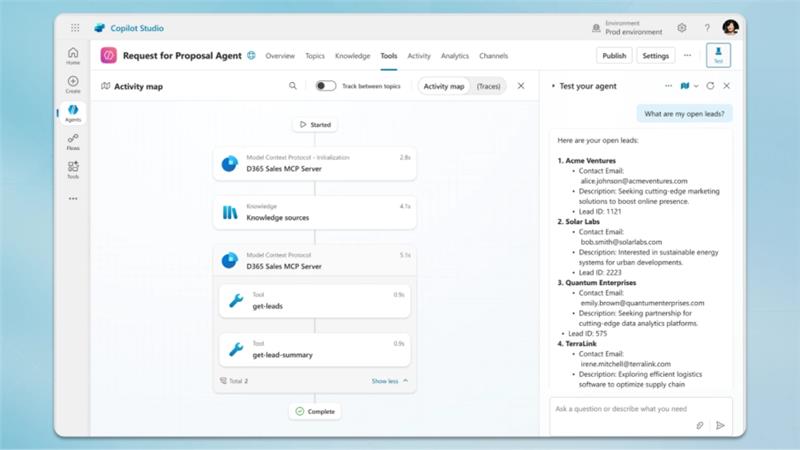
If a system exposes its MCP, the AI agent can receive information about the actions (or tools) it is authorized to perform within that system. Your Generative AI orchestration layer can then decide which action or tool to use to complete a user’s request.
An important benefit is the ease of configuration. The entire interaction schema can be set up using natural language prompts to define the agent’s criteria and goals.
Driving business value with MCP
The Model Context Protocol (MCP) can deliver real value to your organization by streamlining AI agent deployment and operations.
Reduced integration costs and faster deployment
MCP simplifies how AI agents connect to enterprise systems. Using built-in connectors for multiple services, you eliminate the need for extensive custom coding and API management. This translates directly into lower development costs and a faster time-to-market for complex automation initiatives, allowing your teams to deploy high-value agents in hours rather than weeks.
Improved business agility and agent autonomy
MCP enables truly autonomous and flexible AI operations. It allows the Generative AI orchestration layer to autonomously discover and select the necessary action from the available tools based purely on the user’s natural language intent.
This level of intelligent tool selection makes agents more capable of executing seamless, multi-step operations across different systems in a single interaction, significantly increasing efficiency.
Better customer and employee experience
The ability of agents to execute complex, multi-system actions also improves service quality:
- Autonomous agents can instantly process data updates and complete full workflows, speeding up case resolution and leading to higher customer satisfaction.
- Employees are freed from repetitive, low-value data entry and context-switching. The agent handles the back-end execution, allowing your team to focus their expertise on complex problem-solving and strategic tasks.
Using MCP within Copilot Studio
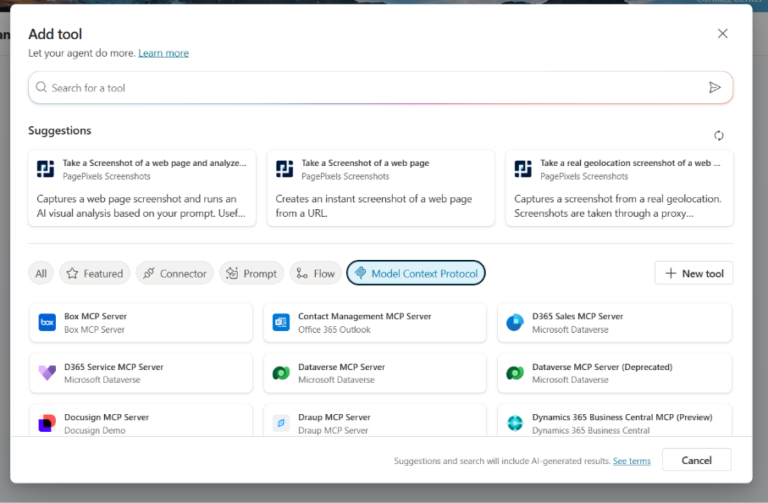
Copilot Studio provides support for MCP, featuring connectors for core Microsoft applications like Dynamics 365 Service, Dynamics 365 ERP, and Dataverse, as well as various third-party systems (e.g., Docusign, Jira). Using MCP is as easy as using Power Automate connectors. We also have the option of setting up our own MCP server for custom scenarios.
Before MCP was introduced, integrating actions was a multi-step process: selecting a connector, choosing an action, and then meticulously describing and configuring every required action parameter. This was a time-consuming step for every action required of the agent.
Now, with MCP, the process is much easier:
- A quick configuration and a well-prepared prompt are all it takes.
- The agent can automatically discover the available tools and create an execution plan to fulfill the request.
Using Model Context Protocol with Dynamics 365
Dynamics 365 includes a built-in MCP, offering out-of-the-box functionality to deploy custom AI agents for critical business scenarios, particularly in customer service.
For example, an agent can automatically answer customer inquiries or even autonomously manage case resolution.
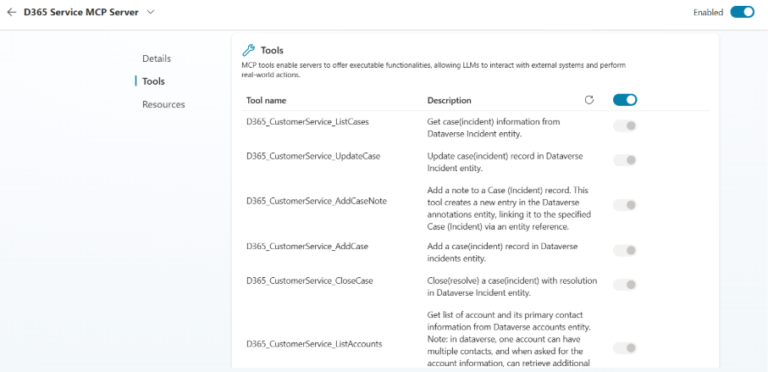
- Case management: ListCases, UpdateCase, AddCaseNote, AddCase, and CloseCase.
- Account management: ListAccounts, UpdateAccount, and AddAccount.
- Customer communication: DraftEmailResponse and SendEmailResponse.
MCP in action: Creating a case
Consider a scenario where an AI agent uses MCP to create a new support case. The steps typically look as follows:
- Request: A user sends a request to the agent (e.g., “Create a new case for Bob with issue ‘slow login’”).
- Recognition: The agent’s LLM recognizes that an external action is required.
- Action lookup: The MCP client identifies the necessary AddCase tool, builds a request with the required details, and sends it to the MCP server.
- Execution: The MCP server translates the request into a Dataverse/Customer Service API call, executes the operation, and returns the result (e.g., a new case ID, status).
- Response: The MCP client feeds the result back to the LLM, which generates the final, natural-language reply for the user (e.g., “Your case has been created. Case ID: 12345”).
Security and governance considerations
When connecting AI agents to external systems, robust security is paramount. Copilot Studio agents use either the end user’s or the agent builder’s credentials to access data. This underscores the need for careful access management. To mitigate potential security risks, we need to adhere to the Principle of Least Privilege:
- Limit the agent’s access to only the information and actions necessary to complete its designated tasks.
- Since agents can access all actions defined in the MCP server, vigilance is required when configuring data permissions.
Additionally, we should properly configure and monitor governance across the Power Platform environment (which can be managed through Copilot Studio or other Power Platform solutions) to prevent unauthorized data access.
Elevate your agents’ capabilities with MCP
The Model Context Protocol (MCP) represents a significant advancement in deploying autonomous AI agents within the Microsoft Power Platform. By providing a standardized, natural language-driven method for agents to interact with external systems like Dynamics 365 and Dataverse, MCP reduces the complexity and time typically associated with custom integrations.
This development enables businesses to more easily build sophisticated, multi-action AI agents that can rapidly automate customer service, sales, and operational processes, driving significant gains in efficiency.
Ready to unlock the full potential of AI automation with Copilot Studio and Dynamics 365? Contact us today to discuss how we can help you implement, configure, and secure your Model Context Protocol integrations for a streamlined, high-performing AI strategy.