
But many of the most powerful tools remain hidden — buried in GitHub repositories, shared quietly in blog posts, talks, or podcasts. They are open source, genuinely useful, and difficult to discover. That’s exactly why this series exists.
This is a three-part series. In Part 1, we focus on tools that help you stay informed, enhance your browser workflow, and plan licensing more confidently. The next parts will cover tools for low-code makers, pro-code developers, and essential utilities every consultant should know.
Keeping up with Power Platform changes
Both community solutions in the Power Platform ecosystem and official Microsoft features evolve at a rapid pace. New tools, improvements, breaking changes, and documentation updates appear constantly. Trying to keep up by manually checking blogs and documentation pages quickly becomes unrealistic – which is why notifications and summaries are so valuable. Below are tools that help you stay up to date without feeling overwhelmed.
Power Platform Deprecation Tracker
Power Platform Deprecation Tracker, created by Ty Corcoran, monitors Microsoft’s official deprecation pages for Power Apps, Power Automate, Dynamics 365 and related services, and notifies you whenever something changes.
Every 12 hours, an Azure Function checks the tracked documentation pages and records any updates. When something new appears, the repository automatically creates a new commit and a release. By watching the GitHub repository, you receive an email notification each time a new release is published. If you prefer fewer notifications, you can simply star the repository and review the change history whenever you need.
The same author has also created the D365 Finance & Operations Deprecation Tracker, which works on the same principle.
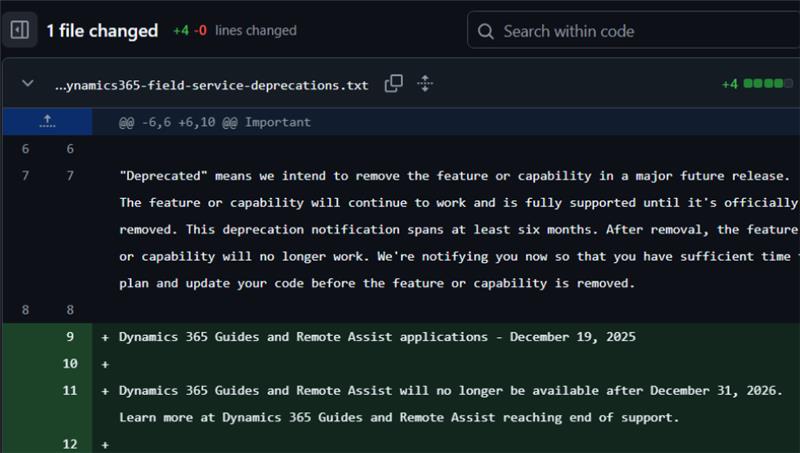
Example notification from Power Platform Deprecation Tracker
Azure Watcher
Azure Watcher is a community initiative by Dieter Gobeyn. It addresses a common problem for Azure developers – while major Azure changes are usually communicated clearly, smaller but still impactful updates often remain hidden in Microsoft Learn documentation and are easy to miss.
The tool continuously monitors Azure documentation across many services and uses intelligent filtering and AI-based summaries to ignore insignificant changes, such as typos or formatting fixes. What remains are the updates that can genuinely affect your work.
Once a week, you receive a summary email highlighting the most relevant changes, including new features, deprecations, and behavioral updates.
Example notification:
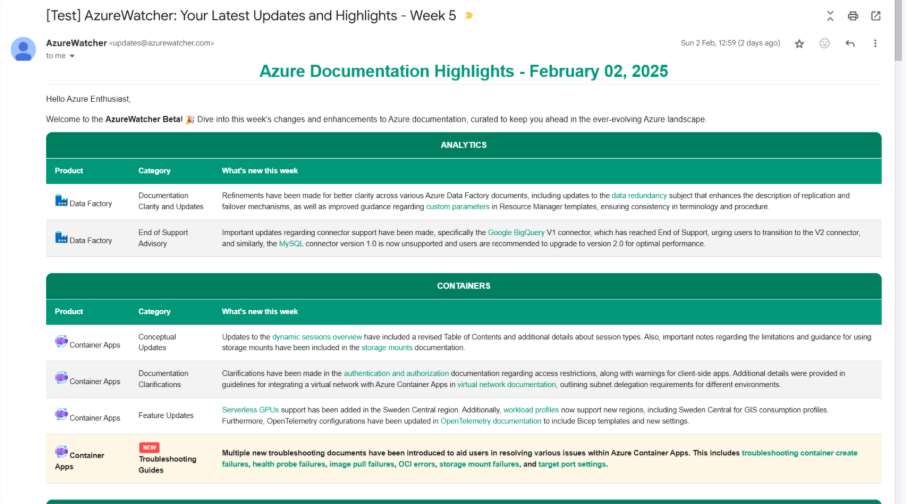
Example notification from Azure Watcher
Source: https://azuretechinsider.com/tracks-azure-documentation-changes-with-ai/
D365 Hub
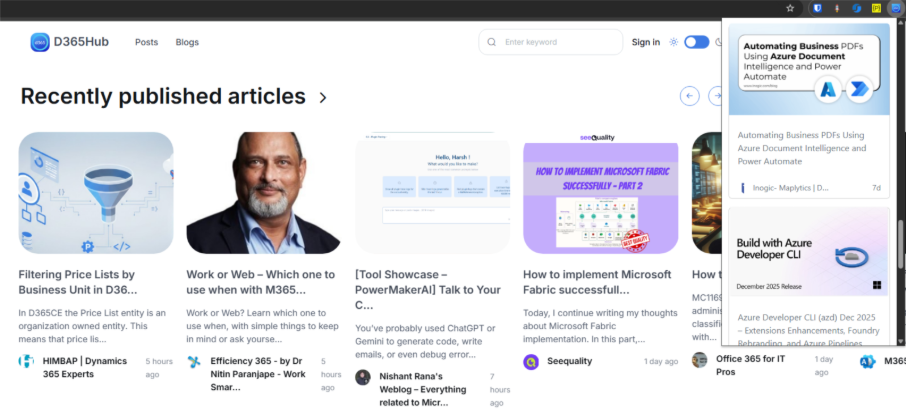
D365Hub is a website that helps you stay on top of what is happening in the Dynamics 365 and Power Platform world. It aggregates content from many different sources – such as community blogs, YouTube channels and podcasts – and brings everything together in one place. Instead of checking dozens of sites individually, you can quickly scan what is new and jump directly to the original source.
D365Hub also offers a browser extension that makes staying informed even easier. It shows the latest posts (based on your selected preferences) directly in your browser in a clean and simple interface. You see the title, image and link, and if something catches your interest, you can open the full article on the original website.
Examples of new articles from the website and the browser extension
Power Platform (Dev) Weekly
D365Hub is great, but it surfaces everything published across community blogs, videos and podcasts – which can easily mean dozens of new posts a day. On top of that, more and more content is AI-generated and not always accurate or truly useful. Reading everything becomes impossible.
Community members can also submit their own posts by providing the URL to their blog’s RSS feed. This way, there’s no need to submit each blog post individually, as new posts are delivered automatically as soon as they’re published on your blog.
The editors decide whether a link is worth including, so the quality stays consistently high. After subscribing, you simply receive an email whenever a new issue is published.
Example email from newsletter:
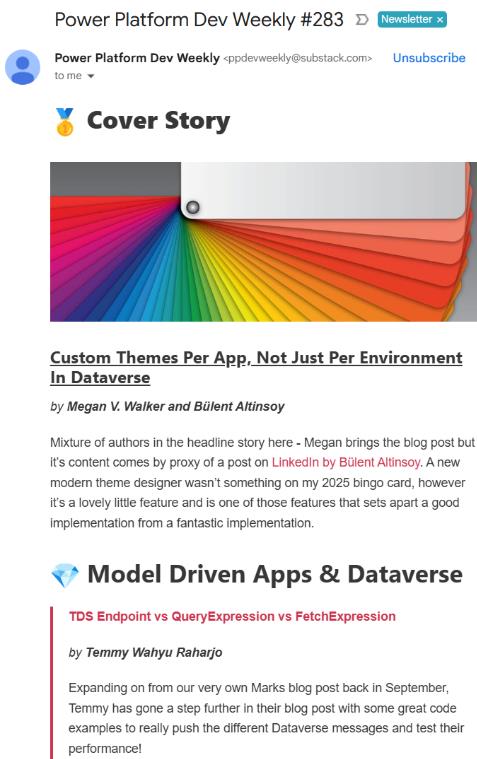
Example email from newsletter
Release Plans Visualized
Anyone who has tried using Microsoft’s official Release Planner knows it can sometimes feel slow and difficult to search. Important updates are split across categories, making it hard to see what has changed recently.
Release Plans Visualized, created by Jukka Niiranen, solves this by taking the official release plan data feed and presenting it in a clear, Power BI-based view. You can quickly filter by product, feature status, date, preview vs GA, and immediately see what has been updated most recently.
The site is refreshed daily and can be bookmarked for easy access. If you prefer, you can also download the report from GitHub and use it locally. It’s not an alternative source of information – it uses the same Microsoft data, just presented in a way that makes sense, without digging through multiple pages.
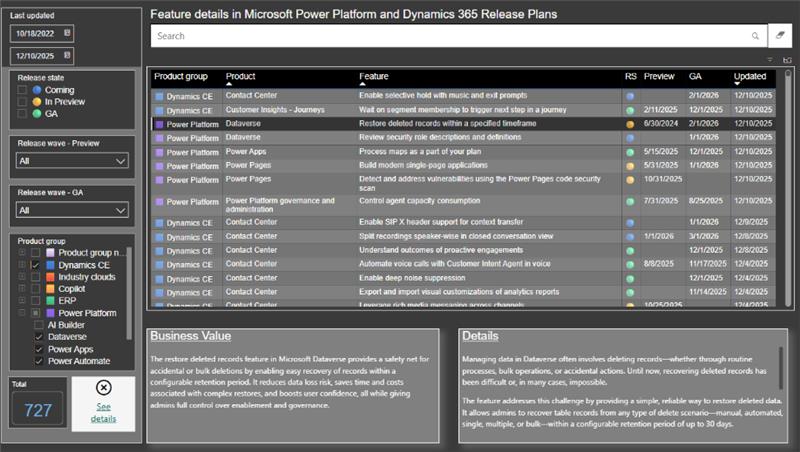
Example of changes in Visualized Release Plan
Power Platform browser extensions
There is no single browser extension that solves every problem in the Power Platform world. Different scenarios require different tools, and most extensions usually focus on a specific set of tasks. The most popular choice today is still Level Up, which I mentioned in the introduction. It covers a huge part of what many consultants and developers need every day and has become almost a must-have when working with model-driven apps and Dataverse.
That said, there are also lesser-known extensions that can make your daily work easier and faster.
Power-Toolkit
In addition to Level Up-style features, it allows you to monitor events so you can quickly identify which scripts, plugins and business rules are running:
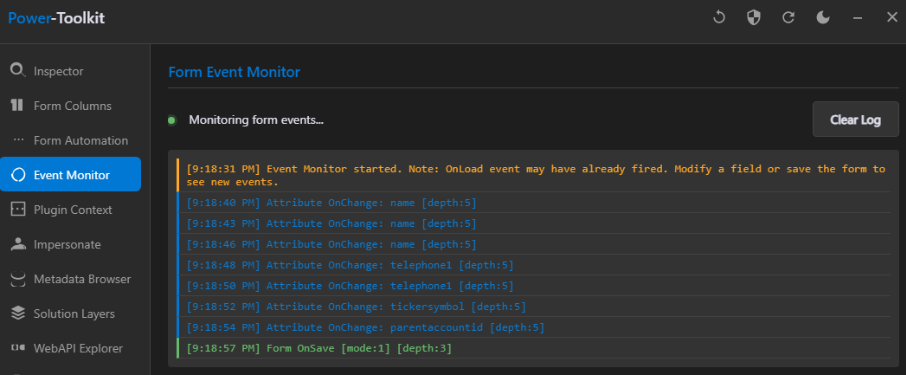
Example of Form Event Monitor
Another thing is the ability to generate full plugin context, including Target and Images. This may be useful when you want to debug scenarios outside Dataverse, for example sending payloads into an Azure Function:
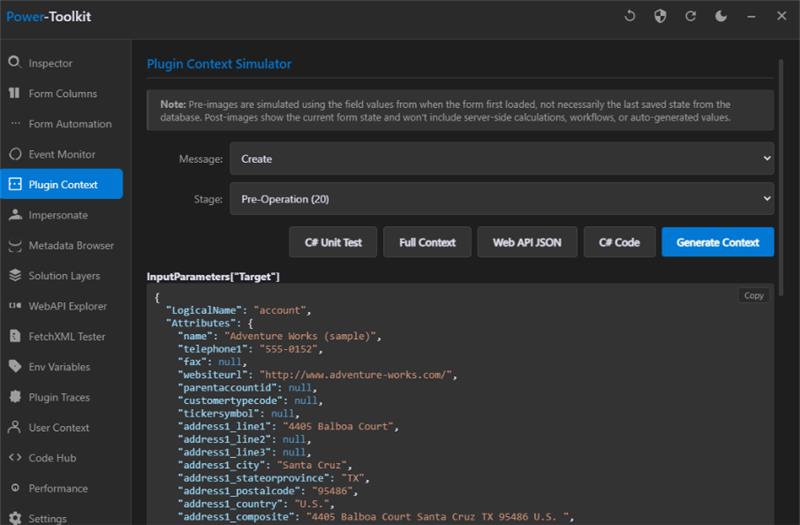
Example of Plugin Context Simulator
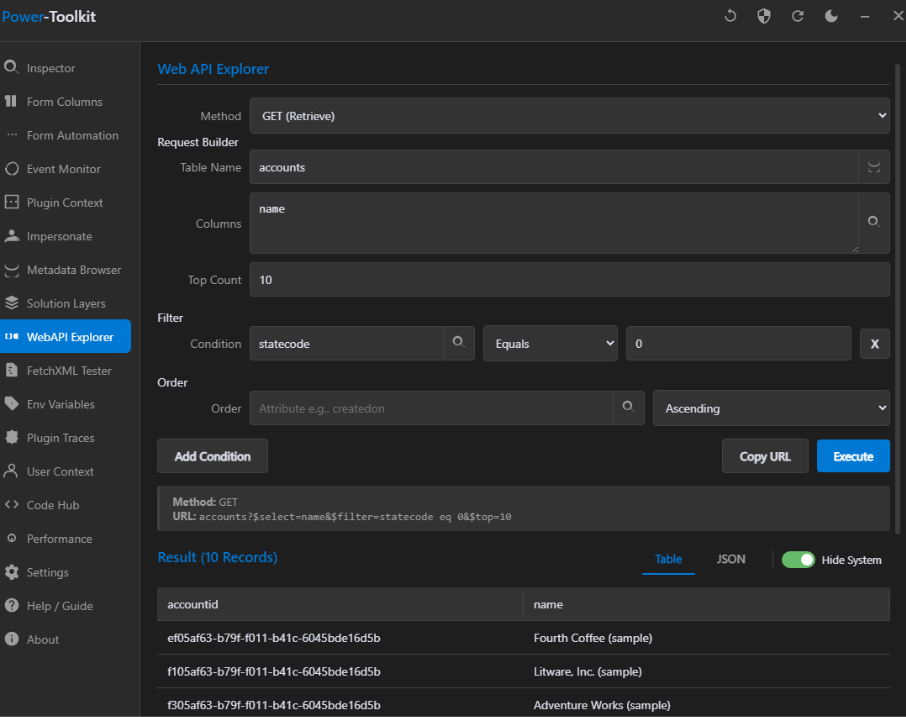
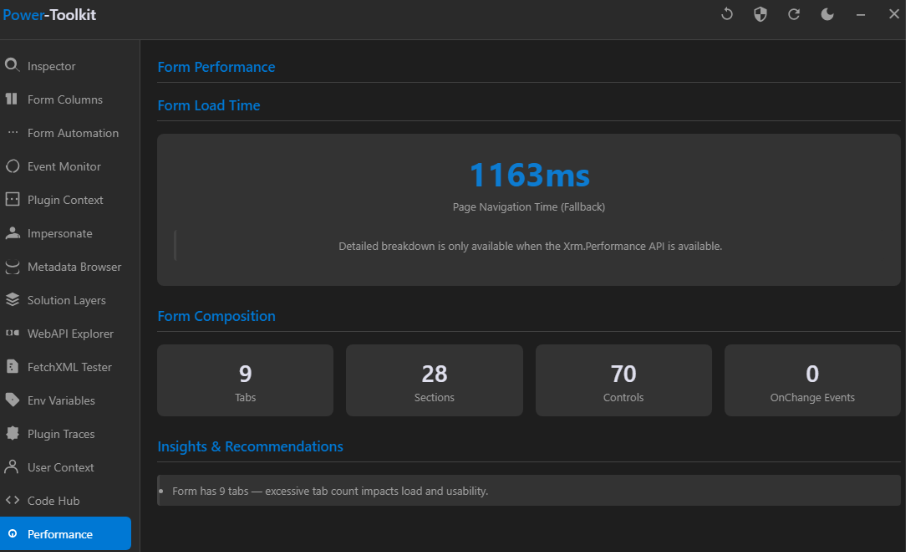
Another useful feature is the form performance analyzer. It shows the total form load time, the number of tabs, sections and controls placed on the form and highlights potential bottlenecks. The tool also provides recommendations on how to optimize and improve form loading experience.
PrettifyMyWebApi
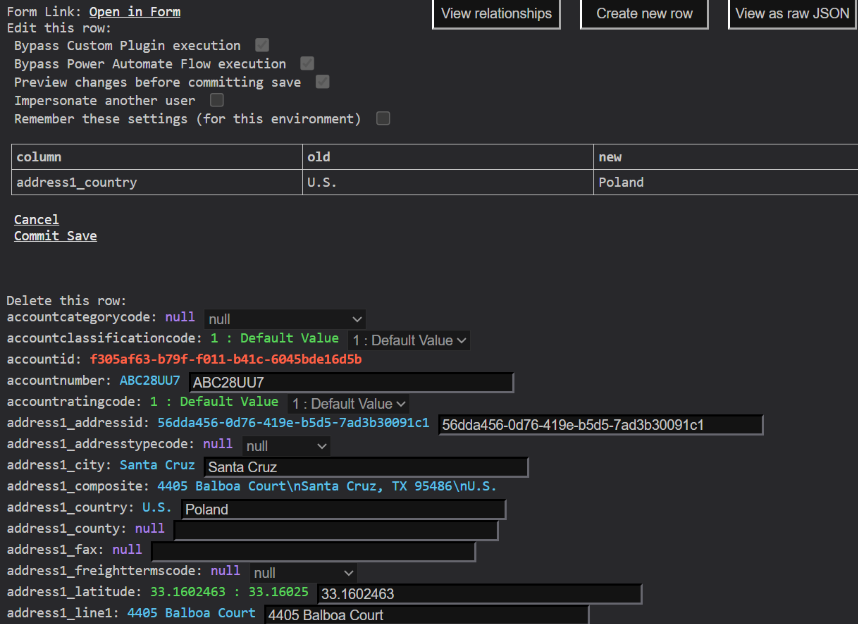
PrettifyMyWebApi ( Chrome) created by Erik Donker, is especially useful when you need to work with data that isn’t available on any form. It opens a Dataverse record directly in the Web API and presents it in a clean, readable view, allowing you to quickly view and edit fields that are normally hidden from the UI. The editing experience supports all common data types, including lookups.
For debugging scenarios, it also offers advanced options that make a real difference. You can impersonate another user, skip plugin execution, or bypass Power Automate flows when saving changes. This helps you isolate issues and determine whether unexpected behavior comes from a specific user context, plugin logic, or automation triggered during updates.
XrmWebTools
XrmWebTools (Chrome), created by Yenthe Rossel, is a browser extension that brings several handy tools directly into your Dynamics 365 environment. It’s mostly built on top of existing features but presents them in a clearer and more user-friendly way.
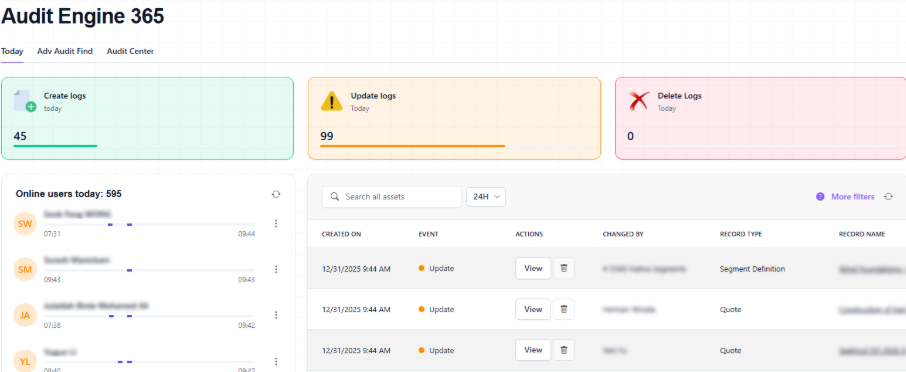
One of its most valuable tools is Audit Engine 365. It extends the standard Audit History but presents it in a more readable format. You can quickly view a daily overview of activity, including which users logged in and when. Each entry shows who made the change, what type of operation it was (Create, Update, Delete), what exactly happened, and includes a link to the record. You can also filter the audit log by any time range.
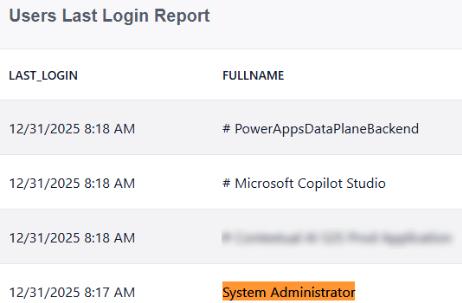
XrmWebTools also includes a User Last Login view, which provides a simple list showing when users last accessed the system. This is helpful when reviewing licensing, adoption or inactive accounts.
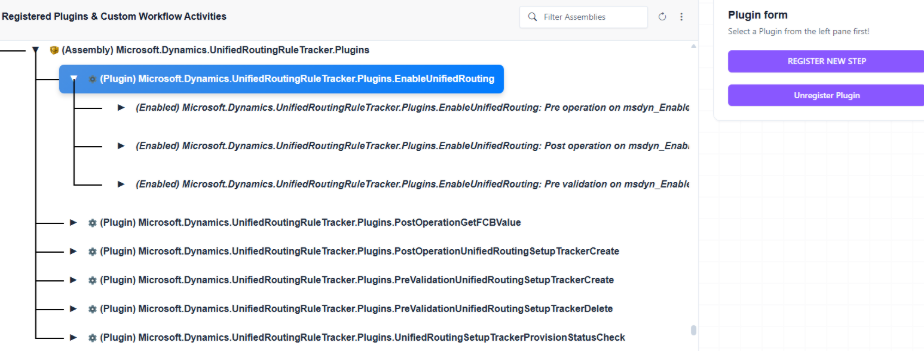
Another interesting feature is the Plugin Registration Tool (Preview). It is still under active development, and while we have noticed some issues (which the author has already been informed about), the concept itself is very promising.
The tool allows you to list and edit assemblies, plugins, steps, images or upload new plugins. It is essentially a web version of Microsoft’s Plugin Registration Tool. This can be particularly useful for macOS users who don’t have access to the official client, as the original tool is built on WinForms and .NET Framework and doesn’t run on macOS.
Finally, there is the Plugin Trace Webviewer. It uses the standard Plugin Trace Log but presents it in a cleaner interface, with the ability to filter by operation, entity or specific record. This makes troubleshooting plugin behavior far more convenient than digging through raw logs.
Dataverse REST Builder
Dataverse REST Builder (Chrome | Edge) created by Guido Preite, is one of the most practical tools for working with the Dataverse Web API. Although it also exists as a XrmToolBox tool, many people primarily use it as a browser extension because it allows you to build and execute API requests directly from your environment, using a very intuitive interface.
Instead of writing requests manually, you select a table, choose the operation and configure parameters. The tool then generates the request for you in multiple formats, including Xrm.WebApi, Xrm.WebApi.execute, FetchXML, jQuery, C#.
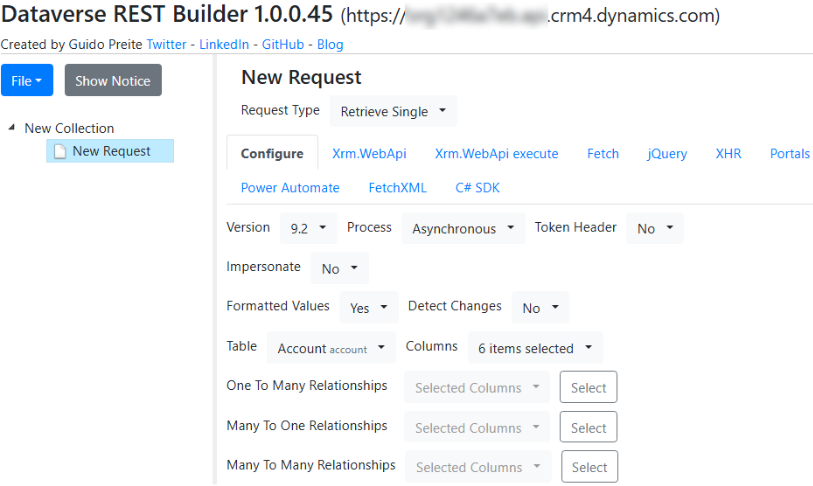
A major advantage is that it can also generate a ready-to-use “Get a row by ID” action for Power Automate. Anyone who has tried to build this manually knows how easy it is to make mistakes – and how time-consuming it can be.
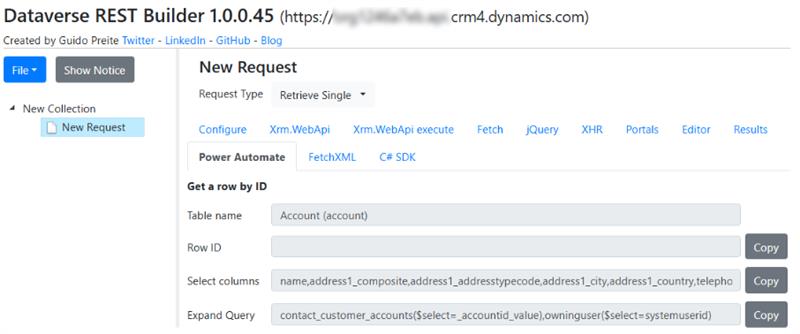
Example of generating ‘Get a row by Id’ Power Automate action
Power Platform licensing & capacity planning
Understanding Microsoft Power Platform licensing can sometimes feel harder than completing a degree. Microsoft certainly doesn’t make it easy – licensing rules change, new products appear, names get updated, plans are restructured, and suddenly what you thought you understood last year works differently today.
Licensing and capacity planning genuinely matter. Incorrect assumptions can cost a lot of money or limit your solution later on. That’s why tools like the ones below are so valuable: they bring clarity to a topic that often feels unnecessarily complex.
Dataverse Capacity Calculator
Dataverse Capacity Calculator, created by Jukka Niiranen, is a web-based tool that helps you estimate how much database and file capacity your tenant receives from different combinations of Power Platform, Dynamics 365 and Copilot Studio licenses. You select the products and user counts, and the calculator shows default capacity, per-user accrual and the total capacity in real time, using visual gauges and a detailed breakdown.
The tool is based on the latest publicly available licensing guidance and is intended as an illustration tool, rather than an official Microsoft calculator. In practice, it is especially useful for architects and consultants who need to explain capacity behavior to customers in a way that is easier to digest than PDF licensing guides.
IMPORTANT:
As the tool’s author clearly states:
“Please do note that this is an AI-assisted creation built with GitHub Copilot […]. The calculation formulas are not guaranteed to be entirely accurate and hallucinations are an unavoidable part of every LLM-generated work product in 2025.”
Keep in mind that this tool is not an official Microsoft tool. It was built as an AI-assisted project and should be treated as an educational aid rather than a precise licensing calculator. Results may differ from real tenant values and should always be verified against the official licensing documentation.
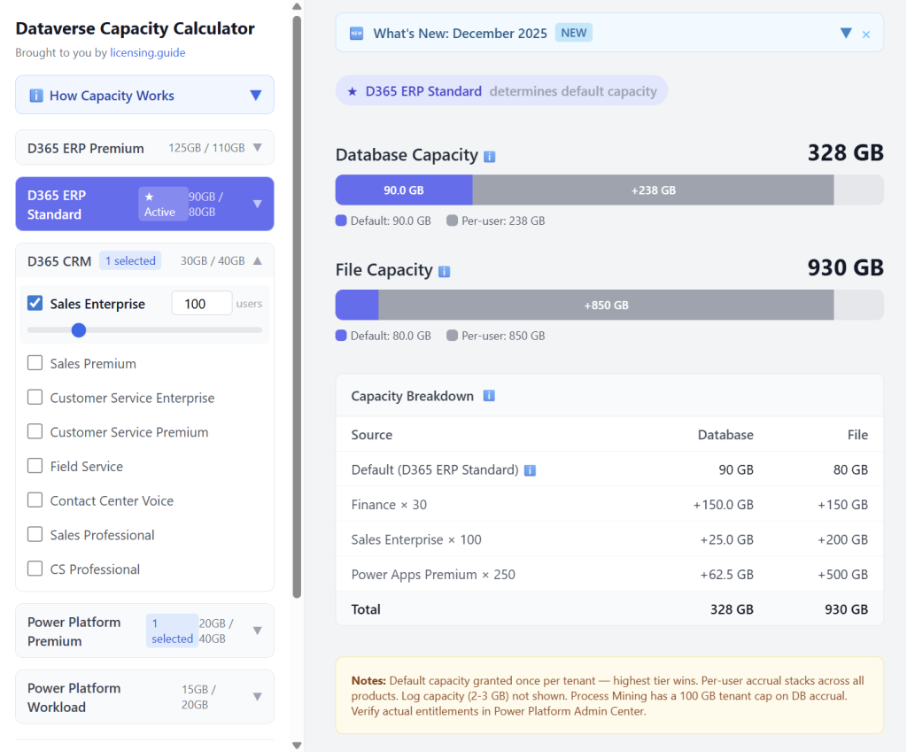
Sample output of Dataverse Capacity Calculator
Source: Dataverse Capacity Calculator
Power Pages Licensing Cost Calculator
Power Pages Licensing Cost Calculator, created by Tino Rabe, focuses on estimating licensing costs for Power Pages websites. You enter the number of authenticated and anonymous monthly active users (MAU) and the number of environments, and the tool calculates how many subscription capacity packs you need, what the monthly and yearly cost will be, and how that compares to Pay-As-You-Go pricing.
It also highlights the included Dataverse storage value and gives guidance on how to correctly interpret MAU, so you do not accidentally overestimate your licensing needs. This makes it much easier to discuss realistic budgets and choose the right licensing model for production Power Pages scenarios.

Azure Cost CLI
Azure Cost CLI (GitHub | NuGet) is an open-source command-line tool that reads cost data from the Azure Cost Management API and outputs it in formats such as console, text, CSV, markdown or JSON. You can quickly check accumulated subscription cost, daily cost, cost per resource or tag, budgets and even detect anomalies and trends.
Because it runs as a .NET global tool, it is easy to integrate into Azure DevOps or GitHub pipelines and generate automated cost reports as build artifacts or job summaries. That makes it a practical way to bring cost visibility directly into your engineering workflows instead of relying solely on the Azure portal.
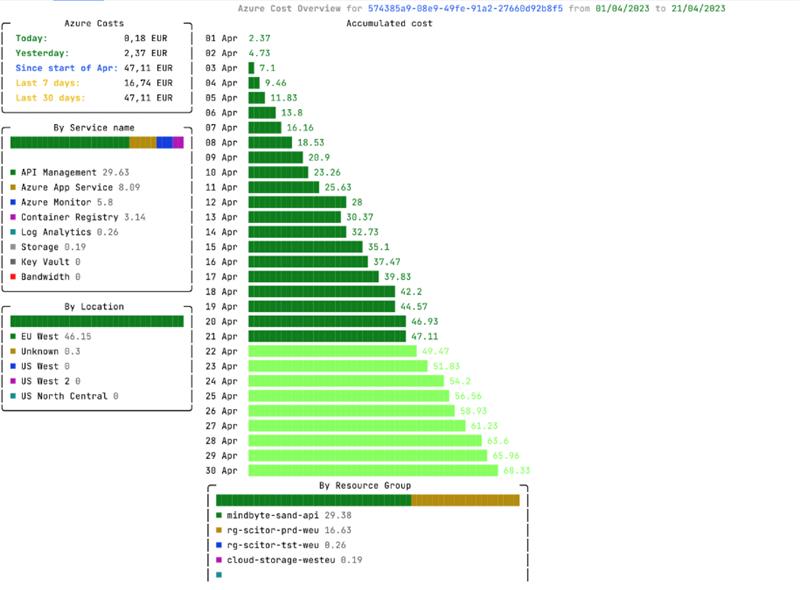
Azure Cost CLI sample output
Source: https://github.com/mivano/azure-cost-cli?tab=readme-ov-file#azure-cost-cli
Microsoft agent usage estimator
Microsoft agent usage estimator helps you forecast how many Copilot credits a single agent will consume each month. You configure parameters such as agent type (internal or external), number of users, interaction frequency, orchestration type, knowledge grounding, flows, autonomous triggers and optional features like prompt tools. Based on this, the estimator shows an approximate Copilot credit volume and a rough cost indication. It is not a pricing calculator or a commercial offer, but a planning aid that helps you understand how design choices will impact your Copilot consumption.
Agent Platform Advisor
Agent Platform Advisor, created by the Power CAT Team, is an interactive questionnaire that helps you choose the right Microsoft platform for your AI agent scenario. Based on your goals, complexity, integration needs and development effort, it guides you toward one of the main options: Microsoft 365 Copilot with pre-built agents, Agent Builder, the full Copilot Studio experience or Microsoft Foundry for full-stack AI development.
After providing a recommendation, the tool also outlines a high-level solution structure and offers a practical implementation checklist. This makes it especially useful during the early design stage, helping you avoid choosing the wrong platform for your use case.
I hope these tools have given you a few new ideas and will genuinely make your daily work easier. Stay tuned for the next parts of the series – there’s plenty more good stuff to come!