In today’s competitive market, customer experience is often what sets companies apart. Fast, efficient Case management is at the heart of that experience – it drives timely resolutions, reduces frustration, and keeps customers satisfied.
Thanks to the current AI revolution, Microsoft is reshaping how CRM systems operate and how users interact with them. In Dynamics 365 Customer Service, several AI assistants support agents every day, including Copilot, Knowledge Management Agent, and Case Management Agent – the focus of this article.
As of November 2025, the Case Management Agent can automatically create Cases, update them, propose resolutions, and – the newest addition – handle Follow-Up and Closure. This AI-driven feature removes repetitive tasks, cuts manual effort, and ensures clear, consistent communication with customers.

What can the Case Management Agent do for follow-up and closure?
In a typical Case lifecycle, customer silence is a common pain point. After receiving the agent’s final proposal, many customers simply stop responding – leaving SLAs running and agents waiting.
The Case Management Agent helps solve this problem by automatically handling two key steps:
- Follow-Up: Sends automated emails after a Case reaches the resolution stage.
- Closure: Closes Cases based on rules if the customer doesn’t respond.
This reduces delays, improves operational efficiency, and gives agents more time to handle complex cases. You can choose full automation or keep the agent in the loop with approval-based automation.
How it works
Follow-up and closure are built into the Case Management Agent and follow a straightforward model:
1. Rule-based automation
Admins define when and how follow-ups should happen, including:
- Case status triggers
- Number of follow-up attempts
- Time intervals between messages
- Email templates used for communication
2. Automation levels
You can choose how much control your Service Agents keep:
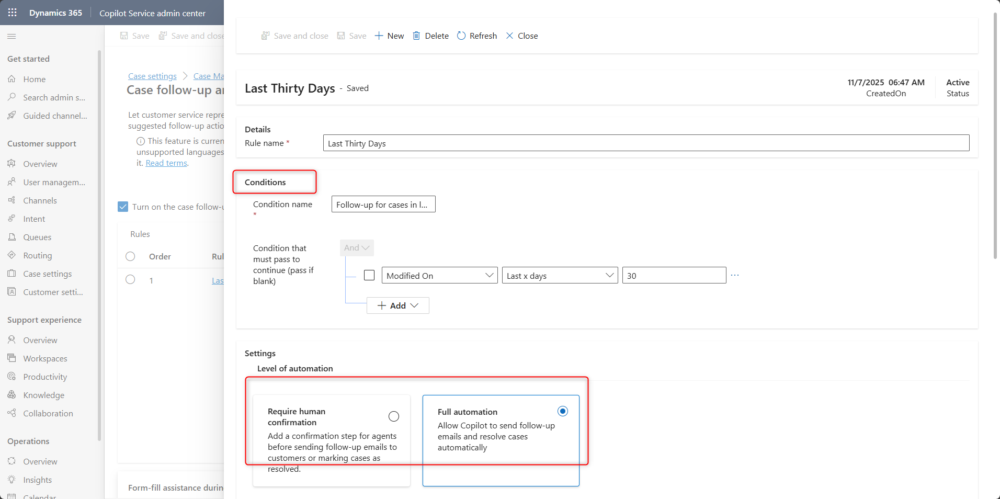
- Full Automation: AI sends emails and closes Cases automatically.
- Partial Automation: AI drafts messages and suggests closure, but requires approval.
3. Customer interaction tracking
- AI-generated emails appear directly in the Case timeline.
- Agents receive suggestion cards with recommended next steps.
4. Intelligent Case closure
Once the maximum number of follow-ups is reached, the Case is automatically marked as Resolved, and all related activities are closed.
But the most important part:
The Case Management Agent understands customer replies.
If a customer responds with something like “Thanks! That works.” the Agent automatically closes the Case and cancels any remaining follow-ups.
How to set it up
The follow-up and closure capability is configured in the Copilot Service Admin Center.
PREREQUISITIES
You must have:
- Customer Service Manager or System Administrator role
- An application user for sending emails
- Copilot templates and email configuration enabled
CONFIGURATION STEPS
- Go to Customer Support > Case Settings
- Select Manage Case Management Agent
- Enable Autonomous Case Follow-Up and Closure
- Create a rule:
- Define conditions (e.g., status reason)
- Choose the automation level
- Set follow-up count and intervals
- Assign existing email templates
You can configure this separately for different lines of business. Many organizations start small – for example, enabling it only for a selected customer group – and expand after reviewing the results. You can also switch to the “requires agent approval” mode anytime.
Why it matters
Customer Service has always been about resolving issues quickly and effectively – both for the customer and for the company. Over time, KPIs like SLAs were introduced to help measure performance, but some operational pain points remained, especially repetitive tasks that drain agent capacity.
AI changes this.
Sending follow-up emails, building content from previous messages, remembering when to close Cases – all these small tasks add up. Multiply them by the number of Cases your team handles every day, and the time impact becomes huge.
That’s where AI Agents help: they take over repetitive steps, freeing Service Agents to focus on what truly matters: helping customers and solving complex problems.
Benefits for businesses
- Efficiency: Reduces manual work for Service Agents.
- Consistency: Ensures every customer receives standard, clear communication.
- Faster resolution: Cases close automatically when rules are met.
- Better customer experience: Customers receive timely updates.
- Insights: AI-based analytics to improve Case handling processes.
Licensing requirements
To use Case Management Agent features, including follow-up and closure, you need one of the following licenses:
- Dynamics 365 Customer Service Enterprise
- Dynamics 365 Customer Service Premium