From a chat that answers to a Copilot that gets work done
There’s no shortage of chat interfaces today. Operations teams use search engines, documentation portals, dashboards and, increasingly, chats powered by language models. Yet their day-to-day work still involves switching between systems: procedures are in one place, equipment status in another, and service work orders in a third.
In this article, we explain how a standard chat differs from an operational Copilot, what an assistant needs before it can go into production, and how to build one on Microsoft Azure using Microsoft Foundry. We then walk through a short demo: from asking about a procedure and diagnosing an equipment issue to automatically preparing a service work order.
Chat vs. operational Copilot: what’s the difference?
Chat is simply an interface: we ask a question and get a generated answer. An operational Copilot goes further by helping us carry out the work. It can be launched from a chat window, but it can also run as a workflow independent of the interface, interacting with a person only at key points.- It understands the operational context of the user it works on behalf of.
- It bases its answers on the organisation’s instructions and procedures, rather than the model’s general knowledge.
- It reads the current state of systems and equipment, working with live data rather than information someone has pasted into a chat window.
- It proposes or performs permitted actions, always within the limits set for it.
- It returns an auditable result: not just the outcome, but a record of the steps that led to it.
The real problem: information and actions spread across systems
The business challenge isn’t a lack of chat interfaces. It’s that information and actions are spread across multiple systems. A manufacturing company provides a good example, well outside the usual IT setting. When a piece of equipment fails, a standard chat can explain how to respond. In the same situation, an operational Copilot:
- retrieves the relevant procedures from its knowledge base,
- checks the equipment’s current status, for example through an API,
- recommends a way to resolve the problem,
- and, if it has the necessary permissions, creates a service work order.
From demo to production: trust and control
Building a working demo is one thing. An agent that reads and changes data in company systems also needs to be trustworthy. That trust rests on five foundations, which should be part of the design from the start rather than added at the end.1. Authentication: who’s asking? The first boundary we set for a Copilot is establishing the identity of the user or service calling it. This provides the context of the person requesting the work.
2. Authorisation: what is the agent allowed to do? Just because a Copilot acts on behalf of an employee doesn’t mean it gets the same permissions. We authorise the agent’s actions as precisely as possible, while keeping the approach practical. An employee with broad permissions should not automatically mean an agent with broad permissions.
3. Confirmation: when should it ask a person? We need to decide in advance which actions require explicit employee approval and which the Copilot can perform on its own. This isn’t about creating a wizard where the user clicks “next, next, next” at every step. It’s about a sensible division of control: the agent handles some of it, while important decisions remain with a person. A typical example is reading data without asking, but writing to a system only after approval—a human-in-the-loop approach.
4. Observability: can every decision be traced? Every tool call and every model decision should leave a trace. This is a starting point for any assistant project, not an optional extra. Without it, we won’t be able to explain why the agent did what it did or improve how it works.
5. Reliability: what happens when something fails? The model, a tool or a dependent service will eventually become unavailable. The Copilot should incorporate failure-handling scenarios familiar from traditional software development, so the process remains under control even when some tools or information sources don’t respond.
The architecture: surprisingly simple
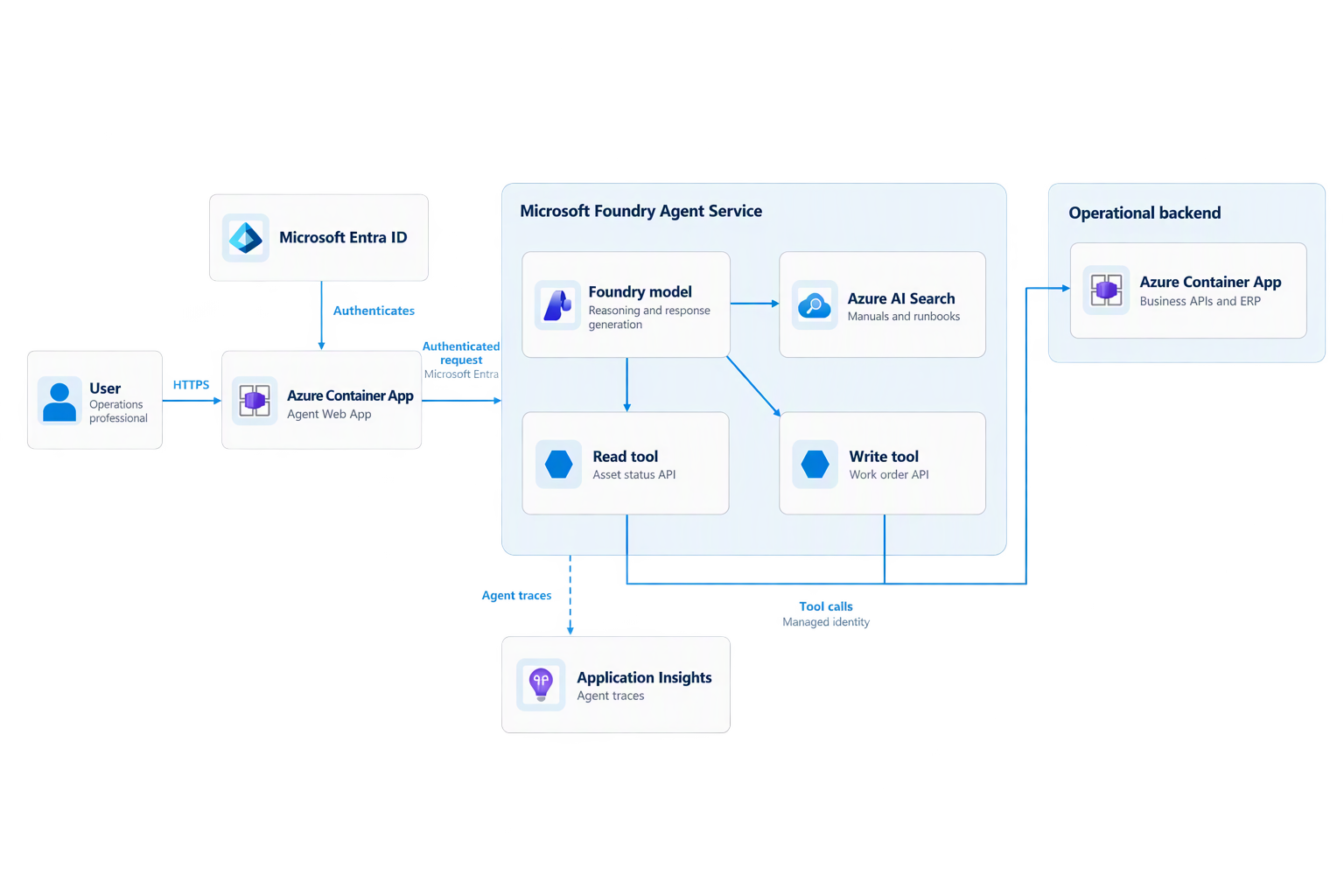
“Building your own Copilot” sounds like a major undertaking, but the underlying mechanism is straightforward. It consists of four elements:- An interface or trigger that signals the agent to start working. Either we describe the task, or the task is already built into the agent and we simply launch it.
- An agent with a language model and instructions that define how it should behave.
- Tools you define yourself, depending on your organisation’s needs, such as APIs for business systems.
- A knowledge base - optional, but very useful in practice, as it ensures answers are based on your procedures.
Importantly, the applications and even the agents themselves – do not have to run in Azure. They can run locally or in another environment while using Azure models and agent services, including over a private network.
What it looks like in practice: a Copilot on Azure and Microsoft Foundry
Solution components
The demo was built to be as cloud-native as possible. It consists of the following components:| Component | Role | Service |
|---|---|---|
| Chat application | User interface used to invoke the agent’s actions | Azure Container Apps (Python) |
| Operational application | ERP-style system for managing equipment and service work orders | Azure Container Apps (Python) |
| Agent | Base model, instructions and tools | Microsoft Foundry Agent Service |
| Knowledge base | Equipment maintenance procedures and instructions | Azure AI Search (Foundry IQ) |
| Monitoring | Logs and call tracing | Application Insights |
| Identity | Authentication and authorisation | Microsoft Entra ID |
The operational application and its API
The operational application is a regular system that a company uses in its day-to-day work. At the start of the demo, it lists three service work orders. Its key feature is an API described using the OpenAPI standard: four endpoints, three GET methods and one POST method. The Copilot doesn’t get a special interface—it uses the same methods as the rest of the organisation.The chat application runs in the user’s context
The chat opens with the user already signed in because it runs in the context of the signed-in employee. In another browser, the same application requires authentication through Entra ID. This is the first foundation of trust in practice.A three-step scenario
Step 1: Copilot as a source of knowledge
The user asks how to respond to repeated equipment shutdowns caused by elevated pressure. They also ask the Copilot to use only internal procedures and cite its sources. The Copilot searches the knowledge base and returns the procedure to follow. At this stage, it works like a good company chat assistant.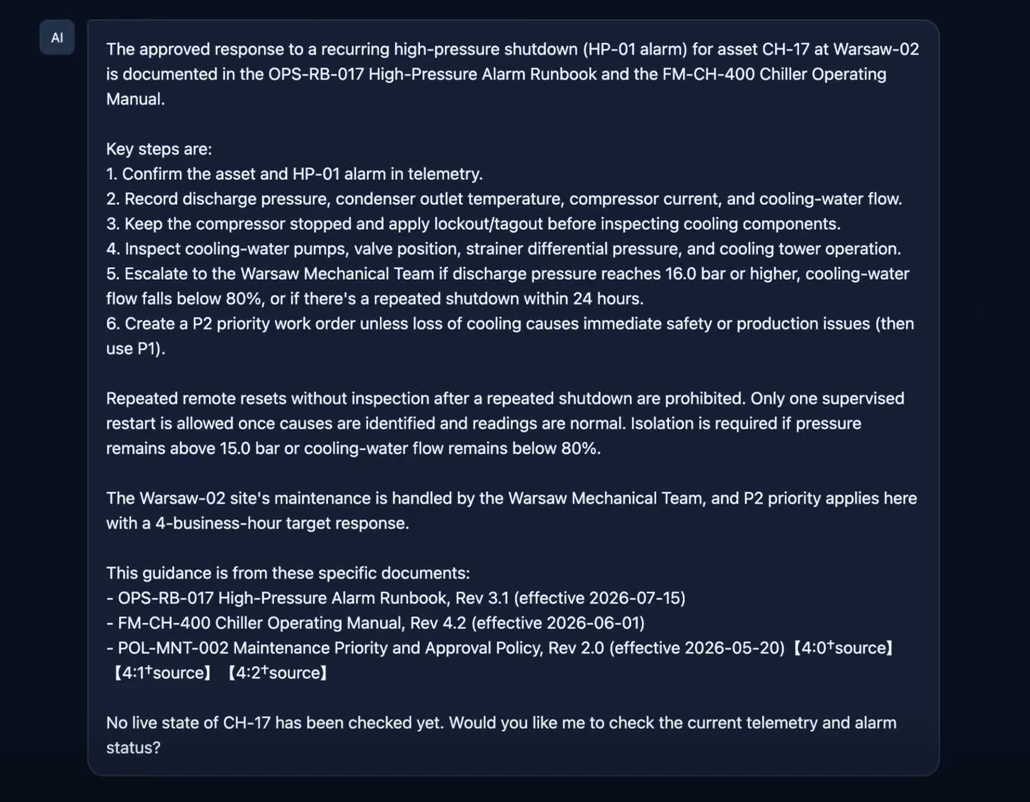
Step 2: Diagnosis using live data
The user then asks it to check the current status of unit CH-17 and compare it against the procedures. The Copilot retrieves the unit’s readings through the API and determines that the critical pressure threshold of 16 bar – the limit at which the unit shuts down – has been exceeded. This is the point where chat becomes an operational Copilot.
Step 3: Taking action with a human in the loop
Finally, the user asks it to prepare a work order for maintenance to address the cause of the problem. The Copilot checks when the unit has a maintenance window and proposes a work order within that window. The previous steps only involved reading data, so they didn’t require approval. Writing to the system does: the Copilot waits for the user’s confirmation.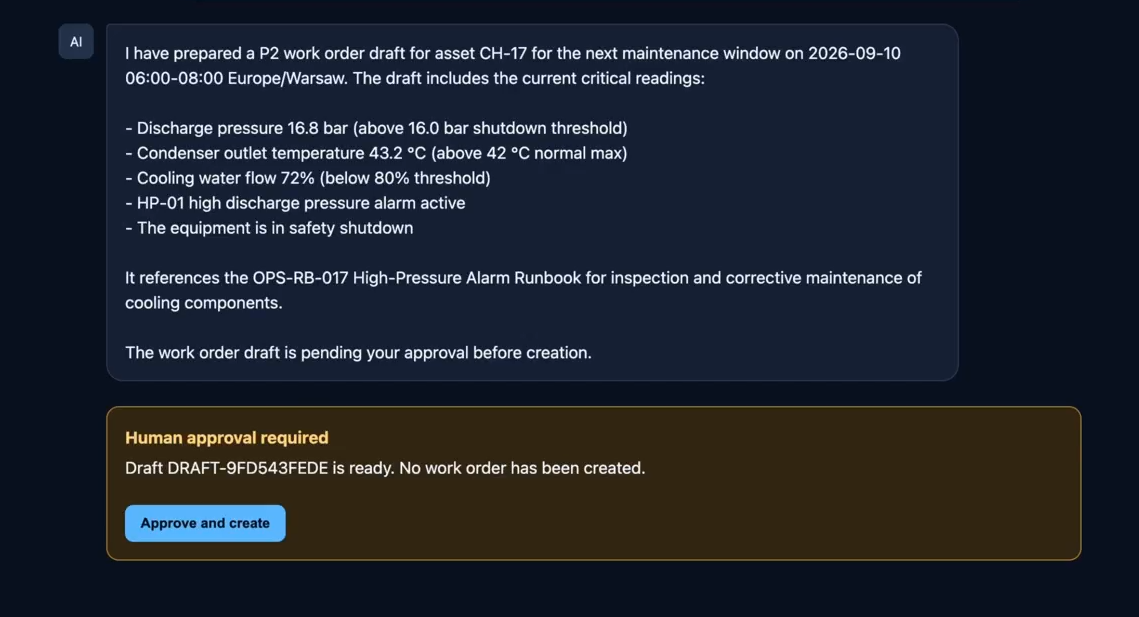
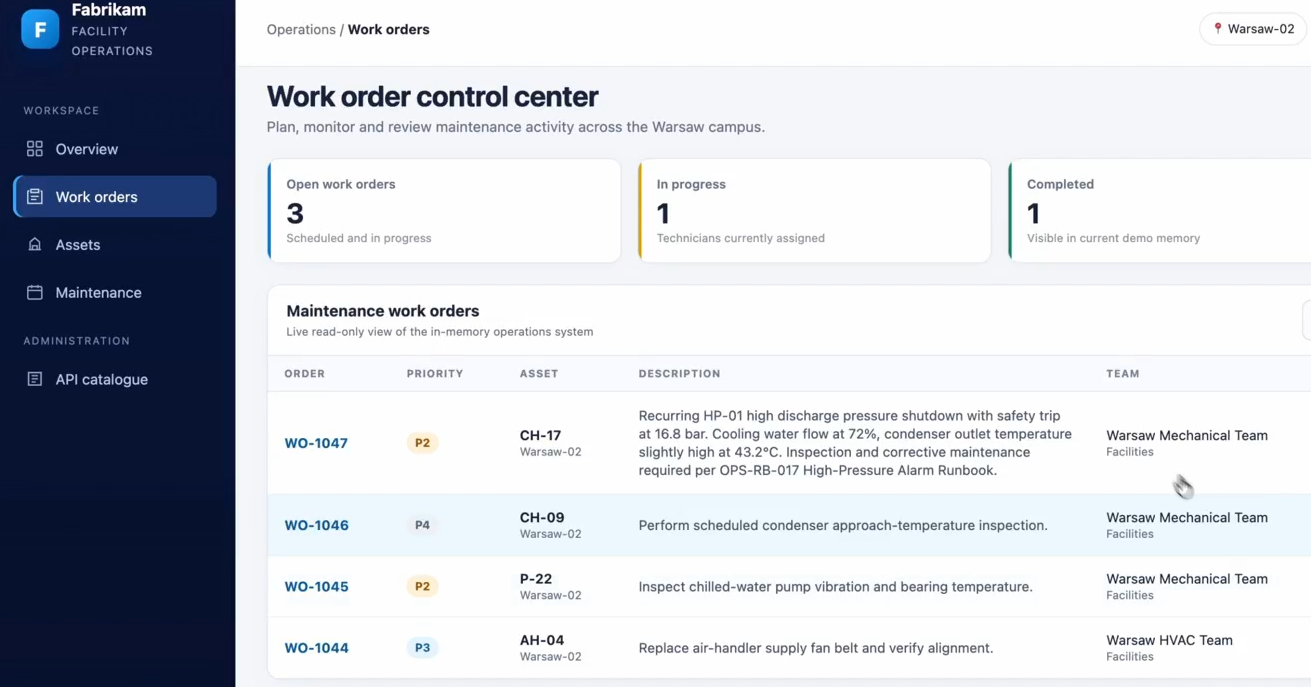
What’s behind it
Tool 1: knowledge base. The Azure AI Search index, recently introduced under the name Foundry IQ, contains three documents: a maintenance policy, a chiller operation and maintenance manual, and a runbook for high-pressure alarms. The documents are short, but this is only a demo; the contents of the knowledge base depend entirely on the organisation. We recommend Foundry IQ for its integration, vectorisation and language-model-based knowledge enrichment, although other services including those outside Azure can also serve as the knowledge base.
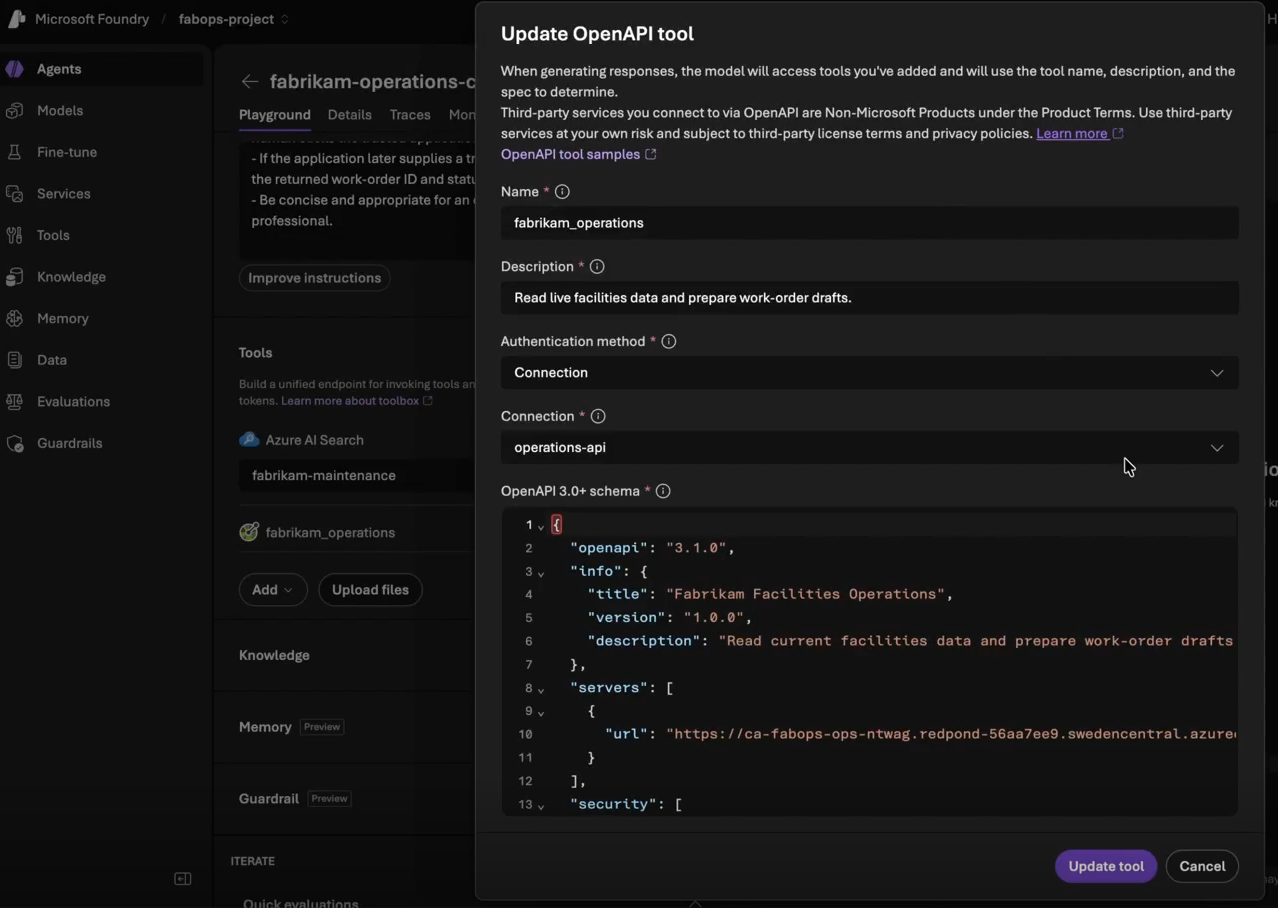
Tool 2: operational application API. A connection to the API was defined in Foundry using an OpenAPI specification. One important detail: the agent doesn’t get all four endpoints. The specification provided to the agent determines what it is allowed to do. Anything not included in it is never considered a possible action. This is a hard boundary enforced in code, not a request written into a prompt. That’s what granular authorisation, discussed earlier, looks like in practice.
Observability in practice
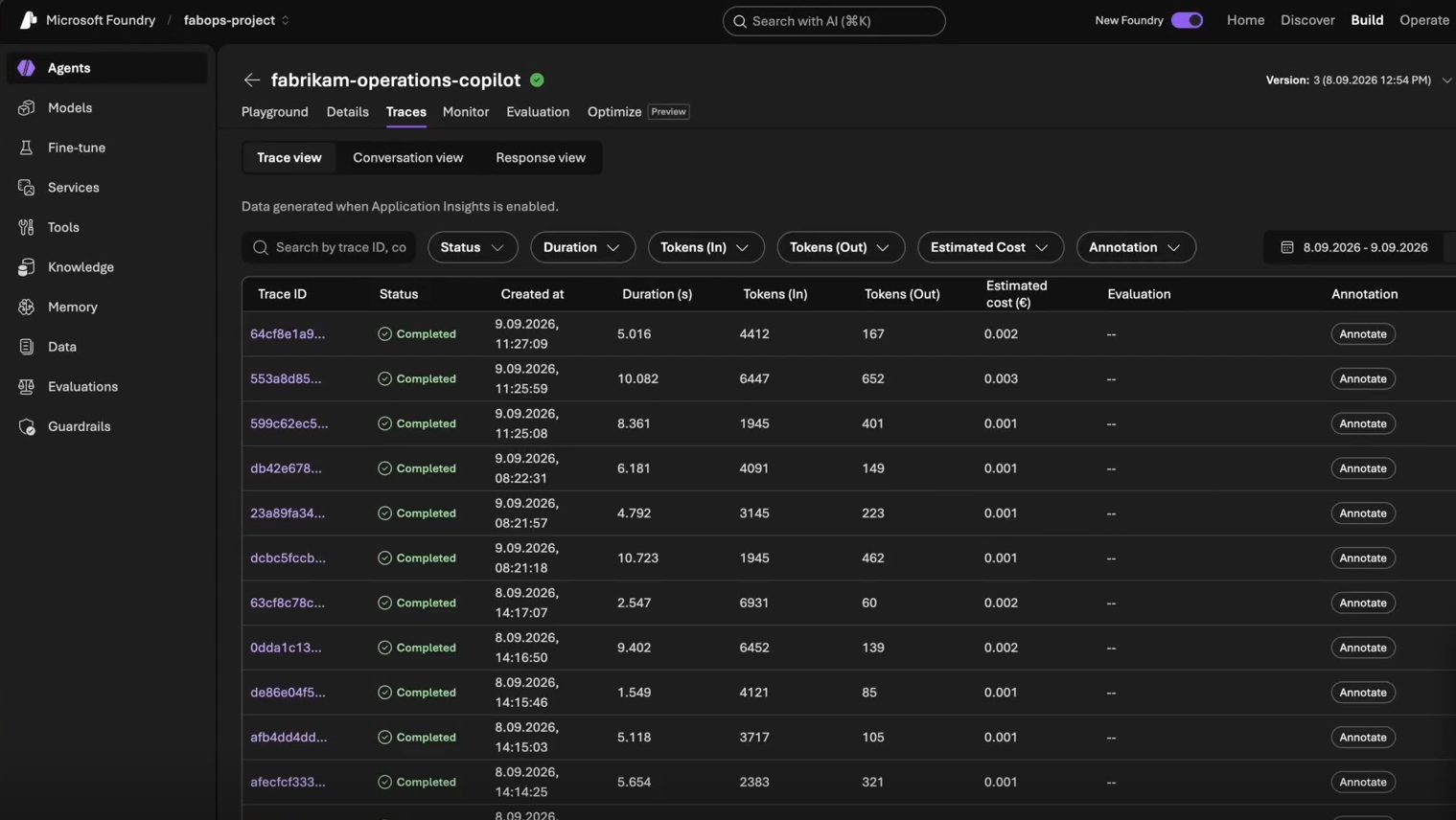
Foundry shows every agent run: its duration 5-10 seconds in the demo – the number of input and output tokens, and the agent version. Looking further, we can see a breakdown of individual steps, tool calls, and the information the tools returned to the agent before it made a decision.
Summary
An operational Copilot isn’t just another chat interface. It’s an assistant that brings together knowledge, data and actions spread across different systems. Technically, it isn’t complicated: an interface, an agent with a model and instructions, a few tools, and a knowledge base. The difficulty lies elsewhere: in designing for trust.
The main takeaways:
- Start with boundaries, not features. Authentication, granular authorisation, confirmation points, observability and resilience to failures are foundations - not extras to add just before deployment.
- The agent’s permissions are not the user’s permissions. It’s best to restrict them in code, for example through a reduced OpenAPI specification.
- Read independently, write with approval. A simple distinction that provides speed without losing control.
- Use existing APIs. A Copilot doesn’t need new systems, just access to those already in use.
- Choose the model to suit the task. A smaller, less expensive model is often enough if it has good instructions and tools.