Introduction - why are we writing about this?
When people say “AI” today, the mind jumps almost automatically to large language models and GPU cards costing tens of thousands of dollars. But a huge share of real, production ML work is far more modest – and far more practical: classification, detection, quality control, anomaly detection. This is a practical guide to planning inference on machine learning models – and in this world, hardware is only part of the story. Different economics apply here. Sometimes so different that the most expensive GPU card on the market loses to a well-configured laptop.
We put that to the test on a live project. As part of a research engagement at Netwise S.A. for a client in the transportation sector, we built the foundations of a visual anomaly detection system – fine-tuned on data specific to the client’s operational domain, with Microsoft Azure as the target environment. Along the way, we ran the same model across several hardware and software configurations to answer a question clients rarely ask early enough: what will this actually cost per month – not per query?
This article is not about training models or fine-tuning – we deliberately stay out of those topics. It’s about something that gets overlooked most often at the planning stage: inference – running a trained model in production, repeated thousands or millions of times, generating a real monthly bill. This is where decisions get made that can determine whether a project is economically viable at all
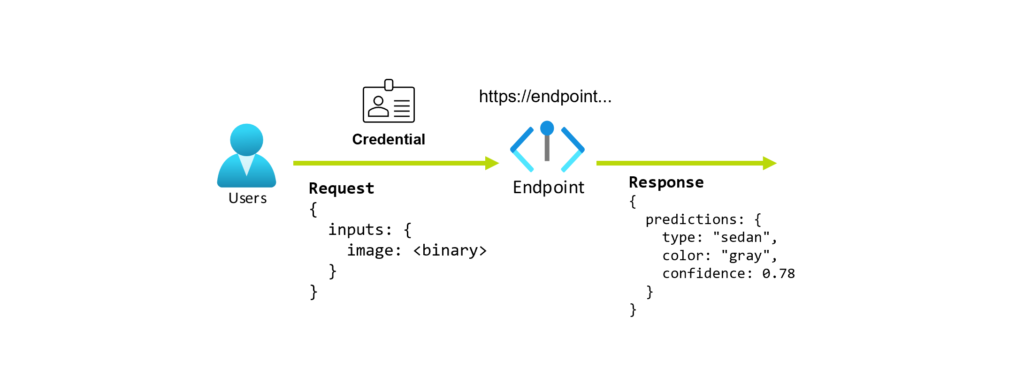
We treat the inference itself – the specific dataset, run parameters, and model configuration details – as a black box. What we share is what matters for the conclusions: the model, the hardware configurations compared, the framework, and the project context. The numbers come from a real research project, not a synthetic benchmark staged for show. What matters here are the ratios and relationships between configurations, not individual milliseconds in isolation.
Below are four dimensions worth considering when planning model inference – and one of them shows that the right framework can do more for your budget than another GPU card. The conclusions apply directly to generative model projects, including LLMs.
What is PatchCore and the Anomalib library
For our tests we chose PatchCore, one of the most widely used visual anomaly detection algorithms, available in the Anomalib library.
Anomalib is an open-source deep learning library developed within the Intel/OpenVINO ecosystem, bringing together state-of-the-art anomaly detection algorithms and enabling their benchmarking on both public and private datasets (Anomalib, documentation). Crucially for our purposes, Anomalib natively supports model export to several runtime formats – including PyTorch, ONNX, and OpenVINO (Anomalib – Get Started). This allows the same trained model to be run on different inference “engines” – which we take advantage of in the final section.
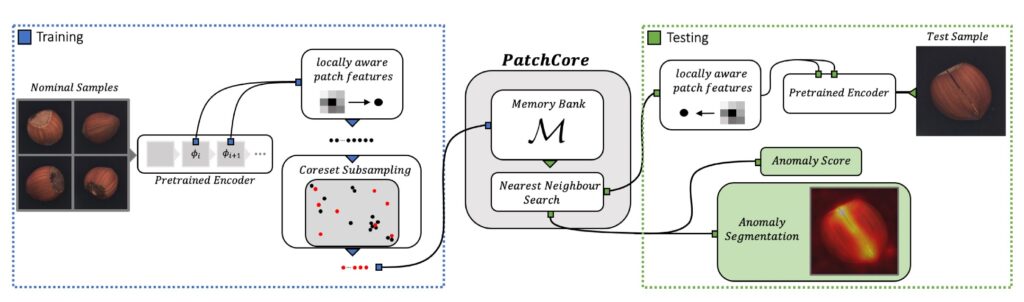
PatchCore works, in simplified terms, like this:
- From “normal” (defect-free) images, a network pre-trained on ImageNet extracts features from image patches.
- These features are stored in a so-called memory bank, reduced via coreset subsampling to a representative subset (Bonview Press, PatchCore).
- During inference, for each patch of a new image, the distance to the nearest neighbour in the memory bank is calculated; the greater the distance, the more “anomalous” that patch is (PatchCore – Anomaly Scoring).
Two things matter for this article. First, PatchCore learns exclusively from normal examples – it doesn’t need a catalogue of every possible defect type, which is a significant advantage in real deployments. Second, PatchCore inference is largely nearest-neighbour search and feature extraction – operations that, as we’ll see, don’t require a GPU to run sensibly.
Cloud vs. local environment – what we’re actually comparing
Before we get to the numbers, let’s establish the comparison framework, because it’s easy to talk past each other here.
On one side we have public cloud (Microsoft Azure) – machines billed by the hour, available on demand, scalable up and down. On the other side we have local (on-premises) environments – but deliberately not in the “own server room with GPU cards costing hundreds of thousands of dollars” version. That comparison would be dishonest and disconnected from the reality most companies face.
Instead, on the local side we put three machines that practically any organisation – or even an individual developer – can afford:
- An average business laptop (HP ProBook)
- A MacBook Air (typical developer hardware)
- A capable “AI PC” workstation with a modern CPU, fast RAM, NVMe storage, and a desktop-class GPU – not a server-class one.
This distinction matters: both the Azure services used and the local machines are expenses within reach of a company of any size. We’re not comparing cloud to hyper-expensive HPC infrastructure, but to the realistic options a client actually faces.
Configurations tested
All tests were run on the same PatchCore model and the same input data, measuring the average time of a single inference in milliseconds. A reminder: we treat the technical details of the inference itself as a black box – what matters for the comparison is that conditions were identical across every configuration, with hardware as the first variable and framework as the second.
Cloud environment - Microsoft Azure (Sweden Central region)
| Machine (SKU) | Type | Processor / accelerator | vCPU | Pay-as-you-go (USD/h) |
|---|---|---|---|---|
| Standard_NC24ads_A100_v4 | GPU (+ CPU) | NVIDIA A100 PCIe 80 GB / AMD EPYC 7V13 (Milan) | 24 | 4.0461 |
| Standard_D4ads_v6 | CPU | AMD EPYC 9004 (Genoa) | 4 | 0.2068 |
| Standard_D4ds_v6 | CPU | Intel Xeon Platinum 8573C (Emerald Rapids) | 4 | 0.2245 |
| Standard_D4pds_v6 | CPU | Azure Cobalt 100 (Arm64) | 4 | 0.1661 |
The three CPU machines were chosen to have the same number of cores/threads (4 vCPU) but different processors – two x86-64 (AMD, Intel) and one Arm64 (Azure Cobalt). This allows a clean comparison of architecture and CPU performance with other variables held equal.
Important caveat: the Standard_NC24ads_A100_v4 is a GPU-first option – Azure doesn’t offer an A100 variant with just 4 vCPU. It comes with a server-grade EPYC 7V13 (Milan) with a minimum of 24 vCPU, six times more cores than the CPU machines in this table. That’s why we don’t directly compare its CPU result against the 4 vCPU machines – we measure CPU performance on this machine “in passing,” to show what a powerful (and very expensive) server processor can do. Its primary reference point remains its GPU.
Local environment (on-premises / development)
| Machine | Type | Processor / accelerator |
|---|---|---|
| "AI PC" workstation | GPU (+ CPU) | Intel Core Ultra 5 245K / Intel Arc Pro B50 16 GB |
| HP ProBook 440 G9 | CPU | Intel Core i5-1235U |
| MacBook Air (A2681) | CPU | Apple M2 |
Software environment (which we return to in later): Ubuntu Linux 24.04 (except macOS on the MacBook), Python 3.12, PyTorch framework – and in the second round, OpenVINO 2026.
Dimension one – the processor itself makes a difference
Let’s start with the simplest question: how much does inference time vary across machines with the same number of cores (4 vCPU) but different processors? We’re comparing only the three machines on the same price tier, so the processor is the sole variable. Average inference times on the PyTorch framework (lower = better):
| CPU machine (4 vCPU) | Avg. inference time - PyTorch (ms) |
|---|---|
| Azure - Intel Xeon 8573C (Emerald Rapids) | 313.0 |
| Azure - Azure Cobalt 100 (Arm64) | 344.7 |
| Azure - AMD EPYC 9004 (Genoa) | 484.8 |
That different processors produce different times is obvious. The scale of the difference is interesting: with the same core count, the fastest processor (Intel Xeon Emerald Rapids) is roughly 1.55× faster than the slowest (AMD EPYC Genoa). In other words, two “4-core” machines at the same price point can differ in performance by half.
For context, it’s worth showing what a processor from a completely different tier can do. The Standard_NC24ads_A100_v4 has a server-grade EPYC 7V13 (Milan) with 24 vCPU – and on CPU alone (measured “in passing,” since this is a GPU machine) it achieves 180.5 ms, roughly 1.7× faster than the best 4 vCPU machine. This isn’t an apples-to-apples comparison – that processor has six times more cores and belongs to a much more expensive machine. It does show, however, that server-grade CPU power makes a real difference, which brings us straight to the money question.
This is the first signal that core count alone doesn’t tell the whole story – and that picking the right SKU has real consequences.
Dimension two – what you pay for is keeping the machine on, not the inference itself
Speed alone says little until we pair it with cost. And here we need to immediately dispel a convenient myth: in practice, in scenarios like this, you don’t pay per inference, or per 1,000 inferences. In this kind of scenario, even “in the cloud,” you pay for the time the machine is running – and in most production scenarios today, that means keeping at least one machine of each required type running continuously, 24/7, all month.
This follows from two things. First, production inference often runs around the clock. Second – and this is a particularly important argument in mid-2026 – GPU infrastructure is a scarce commodity: on-demand availability is frequently exhausted, and reliable access requires advance reservations (more on this below). In this environment, nobody spins down a GPU machine overnight hoping to reclaim it in the morning – because they might not be able to. To ensure continuity, the machine simply has to stay on. The right measure is therefore monthly cost (using the standard 730 hours):
| Azure machine | Price (USD/h) | Cost / month (730 h) |
|---|---|---|
| Standard_D4pds_v6 (Cobalt, Arm, 4 vCPU) | 0.1661 | ~$121 |
| Standard_D4ads_v6 (EPYC Genoa, 4 vCPU) | 0.2068 | ~$151 |
| Standard_D4ds_v6 (Xeon Emerald Rapids, 4 vCPU) | 0.2245 | ~$164 |
| Standard_NC24ads_A100_v4 (GPU, 24 vCPU) | 4.0461 | ~$2,954 |
The proportions are stark. Running a GPU machine for a month costs roughly 24× more than the cheapest CPU machine (~$2,954 vs ~$121) – a difference of around $2,800 per month, per machine. Moreover, you could run all three different CPU machines simultaneously (combined ~$436/mo) and it would still be nearly 7× cheaper than a single GPU machine. This is the real bill that arrives at the end of the month – regardless of how many inferences were actually processed.
What if you billed per 1,000 inferences? (SaaS scenario)
For completeness, let’s also show the measure people often reach for intuitively – cost per 1,000 inferences (inference time × hourly price, normalised to 1,000 samples, PyTorch):
| Azure machine | Avg. time (ms) | Cost per 1,000 inf. (USD) |
|---|---|---|
| Standard_D4pds_v6 (Cobalt, Arm, 4 vCPU) | 344.7 | 0.0159 |
| Standard_D4ads_v6 (EPYC Genoa, 4 vCPU) | 484.8 | 0.0279 |
| Standard_D4ds_v6 (Xeon Emerald Rapids, 4 vCPU) | 313.0 | 0.0195 |
| Standard_NC24ads_A100_v4 - CPU only (EPYC Milan, 24 vCPU) | 180.5 | 0.2029 |
This measure only makes sense in one world: if you were buying inference as a ready-made SaaS service billed per 1,000 inferences. Then you don’t pay for an always-on machine, only for actual usage – and if we assume that on the SaaS provider’s side the risk of GPU shortages is lower (because they manage the hardware pool and share it across many customers), for the end client it would be nearly ideal: you pay only for what you use, without the risk of maintaining an expensive, idle machine.
There is, however, a catch. The per-1,000-inference model almost always implies shared hardware resources with other clients. That in turn raises the level of trust you need to place in the vendor – over data (often sensitive production images), workload isolation, and availability guarantees. For some clients this is an acceptable trade-off; for others (due to regulatory or confidentiality requirements) it isn’t. This is a real decision axis worth navigating consciously.
Coming back to our scenario – running your own machines in the cloud – this is the point where GPU enters the comparison as an option. Let’s look at it honestly.
Dimension three – adding GPU and local machines
Now we bring GPU and local machines into the comparison. GPU in the cloud first.
The NVIDIA A100 on the PyTorch framework runs inference in roughly 11.6 ms (excluding the first “warm-up” sample, which took 278.5 ms – a typical cold-start / kernel compilation effect on GPU). That’s impressive: roughly 15–40× faster than CPU machines. But let’s translate that into the measure that actually appears on the invoice – monthly machine cost:
| Option (cloud, 24/7) | Avg. time (ms) | Cost / month (730 h) |
|---|---|---|
| A100 GPU (PyTorch, "warm") | 11.6 | ~$2,954 |
| D4pds - Cobalt CPU (PyTorch) | 344.7 | ~$121 |
Here’s the first key finding of this article: GPU is ~30× faster per inference, but costs ~24× more per month to run. The speed of a GPU is real – it’s just that in the “machine always on” scenario, you pay for it regardless of how many inferences actually went through it. If the model isn’t running at 100% load continuously, much of that speed goes to waste while the bill keeps running.
GPU wins when you need real-time low latency or very high, sustained throughput that actually saturates the card. But for many batch scenarios – and there are plenty of those in industry – CPU is perfectly sufficient and significantly cheaper to maintain.
On top of the price difference comes availability. As of June 2026 the cloud GPU market is severely strained: industry analysis describes Nvidia on-demand capacity as essentially sold out – all capacity coming online through August–September 2026 has already been booked (SemiAnalysis via ICLE), and obtaining cards often requires a formal reservation and weeks of waiting for quota even at hyperscalers (Spheron – Azure H100 2026). This is another strong argument for CPU: CPU machines are unlikely to run out, and the risk of shortage is incomparably lower than with GPU. In practice, a CPU machine can be kept in continuous readiness without the concern that after releasing it, you won’t get it back – which cannot be said of GPU today.
Now local machines (PyTorch framework, inference time in ms):
| Local machine | Processor | Avg. time - PyTorch (ms) |
|---|---|---|
| "AI PC" workstation (CPU) | Intel Core Ultra 5 245K | 164.2 |
| MacBook Air | Apple M2 | 170.5 |
| HP ProBook 440 G9 | Intel Core i5-1235U | 571.2 |
The result is instructive: the local workstation (164.2 ms) on CPU beats every cloud CPU machine at 4 vCPU – without even using its GPU. What’s more, it outpaces the server-grade EPYC Milan with 24 vCPU (180.5 ms) from the A100 machine. Even a standard MacBook Air (170.5 ms) outperforms all 4 vCPU machines in Azure. On the other hand, the average business laptop (i5-1235U, 571.2 ms) is the slowest in the entire test – which shows that “local” is a very broad concept.
Interim conclusion: a modern, well-chosen CPU – including in a laptop or workstation – is a serious foundation for inference. A GPU is not a necessity. But the story isn’t over yet, because so far we’ve only changed the hardware. What happens when we keep the hardware the same and change the software?
Dimension four – software is often more important than another core
Until now, all tests ran on Ubuntu 24.04 (except macOS on the MacBook), Python 3.12, and the PyTorch framework.
What is PyTorch? It’s the most popular deep learning framework today, valued for its flexibility and vast ecosystem. It works well for both training and inference, on CPU and GPU.
It’s the natural “default” choice – and that’s exactly why almost nobody asks whether something better exists for inference specifically on CPU.
As it turns out, something does. We introduce a new variable: the same model, the same machines, the same OS – but we switch the inference framework from PyTorch to Intel OpenVINO 2026.
What is OpenVINO? It’s Intel’s open-source toolkit for optimising and running inference, designed to extract maximum performance from Intel processors (CPU and Intel Arc GPU), but also functional on other architectures. OpenVINO optimises a model’s computational graph, applies quantisation, and adapts execution modes to the specific hardware (OpenVINO – Optimize Inference).
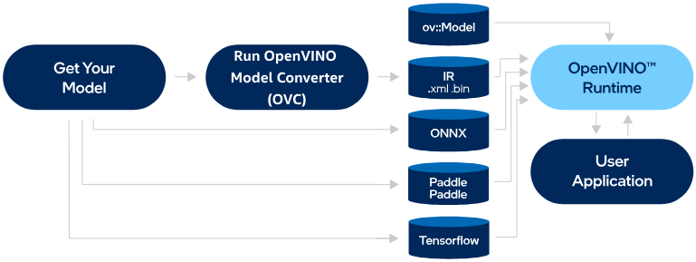
Crucially, Anomalib exports models to OpenVINO out of the box (Anomalib – Get Started), so switching frameworks doesn’t require rewriting the model – it’s a change to the runtime layer, not the model itself.
The effect? Same hardware, same model – but the times drop:
| CPU Machine | PyTorch (ms) | OpenVINO (ms) | Speedup | Time reduction |
|---|---|---|---|---|
| Azure - EPYC Genoa (4 vCPU) | 484.8 | 333.0 | 1.46× | −31% |
| Azure - Cobalt Arm (4 vCPU) | 344.7 | 249.2 | 1.38× | −28% |
| Azure - Xeon Emerald Rapids (4 vCPU) | 313.0 | 245.6 | 1.27× | −22% |
| Azure - EPYC Milan (24 vCPU, GPU machine) | 180.5 | 131.3 | 1.38× | −27% |
| Local - Core Ultra 5 245K | 164.2 | 126.4 | 1.30x | -23% |
| Local - i5-1235U | 571.2 | 451.0 | 1.27x | -21% |
| Local - Apple M2 | 170.5 | 159.5 | 1.07x | -6% |
A framework swap alone delivered 20–31% shorter inference times on most CPU machines – without adding a single core or spending a penny on hardware. Notably, the smallest gain was on Apple M2 (−6%) – which is expected, since OpenVINO is optimised for Intel hardware, not Apple Silicon.
Now for the economic payoff. Remember what we established in Dimension 2 section: in a real scenario you pay for the machine being on, not for each inference. So what does switching to OpenVINO actually give you at a fixed monthly machine cost? It gives you more images processed for the same price. Since the monthly cost of a CPU machine stays constant (~$121–$164/mo depending on SKU) while inference is 20–31% faster, the same machine – for the same money – will process 20–31% more images in a month. That’s pure throughput gain from the software layer, with no added hardware and no increase in the bill.
Note – GPU doesn’t always beat CPU.
An interesting nuance from the same test round: in the “AI PC” workstation, the Intel Arc Pro B50 under OpenVINO achieves 255.9 ms – slower than the CPU of the same machine (Intel Core Ultra 5 245K: 126.4 ms). In other words, for this type of model, a consumer/professional Intel GPU doesn’t always outperform a well-configured CPU. This is further evidence that “adding an accelerator” is not an automatic answer – what matters is the match between hardware, framework, and model characteristics.
And if we were to bill per 1,000 inferences – returning to the hypothetical SaaS scenario from Dimensions 2 section – OpenVINO shifts that measure too:
| Azure machine (vCPU) | Cost per 1,000 inf. - PyTorch (USD) | Cost per 1,000 inf. - OpenVINO (USD) |
|---|---|---|
| D4pds - Cobalt (Arm, 4 vCPU) | 0.0159 | 0.0115 |
| D4ds - Xeon Emerald Rapids (4 vCPU) | 0.0195 | 0.0153 |
| D4ads - EPYC Genoa (4 vCPU) | 0.0279 | 0.0191 |
| A100 - GPU (24 vCPU, reference) | 0.0131 | - |
And here is the punchline of the entire article – and it holds across both measures. In per-1,000-inference terms, the cheapest CPU machine with OpenVINO costs $0.0115 – less than the A100 GPU ($0.0131), which is ~30× faster per inference. And in monthly machine cost terms, that same CPU machine runs ~$121/mo versus ~$2,954/mo for GPU. Both measures point in the same direction: software – not another core or a GPU – turned out to be the lever that shifted the break-even point.
Conclusion - where all four dimensions meet
- The processor matters - two "4-core" machines in the same price bracket can differ in performance by roughly 1.55× (Intel Xeon vs AMD EPYC Genoa). SKU choice alone - with no change in cost - makes a real difference.
- What you pay for is keeping the machine on, not the inference - in a real scenario you pay for a machine running 24/7, not individual inferences: ~$121/mo for CPU versus ~$2,954/mo for GPU (~24× more). Per-1,000-inference pricing - ideal for the client - only makes sense in a SaaS model, and that implies shared resources and higher vendor trust requirements.
- GPU is not a necessity - and in 2026, it's often hard to get - the A100 is ~30× faster per inference, but for batch workloads a well-chosen CPU wins the economic argument; on top of that, GPU is currently a scarce commodity (advance reservations required, risk of unavailability), while CPU machines are far easier to secure. A modern CPU - including a local one - is a solid inference foundation.
- Software is often more important than hardware - switching the framework from PyTorch to OpenVINO alone delivered 20–31% shorter inference times: at a fixed monthly machine cost, that's 20–31% more images processed for the same money - and it pushed the cheapest CPU machine below GPU cost on both measures.
All four dimensions converge in one place – and it’s a business point, not just a technical one. Inference performance isn’t just a question of “add more cores” or “buy a GPU.” It’s the sum of decisions about the processor, billing model, compute location, and – most often overlooked – the software layer.
If one thought from this article is worth keeping, it’s this: the fastest way to make your GPU bill stop hurting isn’t a smaller GPU. It’s the right framework.
Adding more cores or GPU cards is the simplest strategy – but rarely the cheapest or best one. In our project, what delivered more value was the ability to recognise the problem, test several configurations, and tailor the solution to the situation: one that achieves better results on cheaper infrastructure because the software layer, not the hardware, was better designed.
Hardware isn’t the whole story. Neither is software alone. A good project partner is there precisely to bring both together – choosing the hardware, framework, and billing model so that inference costs as little as possible while delivering the best possible result.
But the picture isn’t complete yet: once the right hardware and framework are chosen, the question becomes how to wrap it all into a system that actually runs in production.
Beyond the single VM - production deployment in Azure
Above, we deliberately reduced the cloud to its simplest form: a single virtual machine (VM) that we switch on, measure, and bill by the hour. That was intentional – it allowed a clean comparison of processors, costs, and frameworks without muddying the picture. But it’s worth being honest: in a real production deployment in Microsoft Azure, almost nobody builds an inference system on bare VMs. You can – and sometimes it makes sense – but it’s usually a starting point, not the destination.
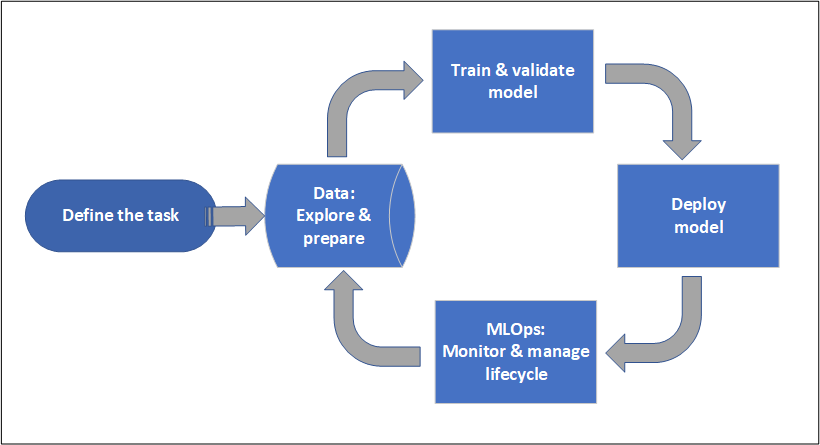
When a project moves beyond a single benchmark, new questions arise that “one running machine” can’t answer: how do you scale inference for variable load? how do you process large overnight batch jobs? how do you version the model, deploy a new version with zero downtime, monitor quality and costs? This is where orchestration services come in, and the right choice depends on the full scenario you need to realise:
Azure Machine Learning (Azure ML) – the natural choice for most ML scenarios. It lets you wrap a trained model in managed endpoints: online endpoints for real-time inference (stable URI, authentication, TLS termination, autoscaling) and batch endpoints for processing large volumes of data periodically. This online vs. batch split is often what determines whether you need a GPU at all, or whether a well-chosen CPU will do – which we kept returning to in the earlier sections.
Azure Batch – a service for computationally intensive batch jobs. It suits scenarios where inference isn’t a continuous stream of requests but periodic, large “passes” through datasets – and where you want full control over the machine pool and schedule.
Microsoft Foundry – Microsoft’s platform for building AI applications and agents (until recently known as Azure AI Foundry), which unifies inference, evaluations, monitoring, and the Foundry Agent Service. Foundry becomes relevant especially when anomaly detection is part of a broader AI solution – for example, working alongside generative models, agents, or a quality assessment layer.
In other words: a VM is a brick, not the whole building. Whether you build on Azure ML, Azure Batch, or Foundry follows from the shape of the entire scenario – the nature of traffic (online vs. batch), latency requirements, scale, integration with the rest of the system, and cost model.
AI/ML Landing Zone - the "how" of deployment, not just the "what"
Bringing these services into production usually goes beyond switching them on. It means building a dedicated AI/ML zone within an Azure Landing Zone – a defined set of principles, guidelines, and preconfigured blueprints that tell teams how to deploy: how to segment networks, manage identity and access, encrypt and isolate data, monitor costs and security, and maintain compliance.
A common misconception worth clearing up: according to current Microsoft Cloud Adoption Framework guidance, you typically don’t build a separate “AI Landing Zone” alongside your existing one. AI workloads are deployed into application landing zones on top of the standard platform Azure Landing Zone, the same way as any other workload.
In practice, AI resources (Azure ML, Foundry, data stores) land in Application Landing Zone subscriptions, following the subscription democratisation principle (Cloud Adoption Framework – AI updates and Landing Zone design). This gives a ready-made, well-architected foundation with built-in security, compliance, and operational efficiency – and one that can be deployed as code, making it repeatable and auditable.
PoC vs. production - what a deployment actually consists of
This is an important distinction that’s easy to miss when looking only at benchmark numbers. At the Proof of Concept stage, not all of these elements are necessary. That’s exactly why we could measure inference times on individual machines in this article – at the research stage, the question was “which hardware and framework,” not “how do we stand up a full production system.” That’s the right order: understand the model’s characteristics and costs first, then build the production wrapper.
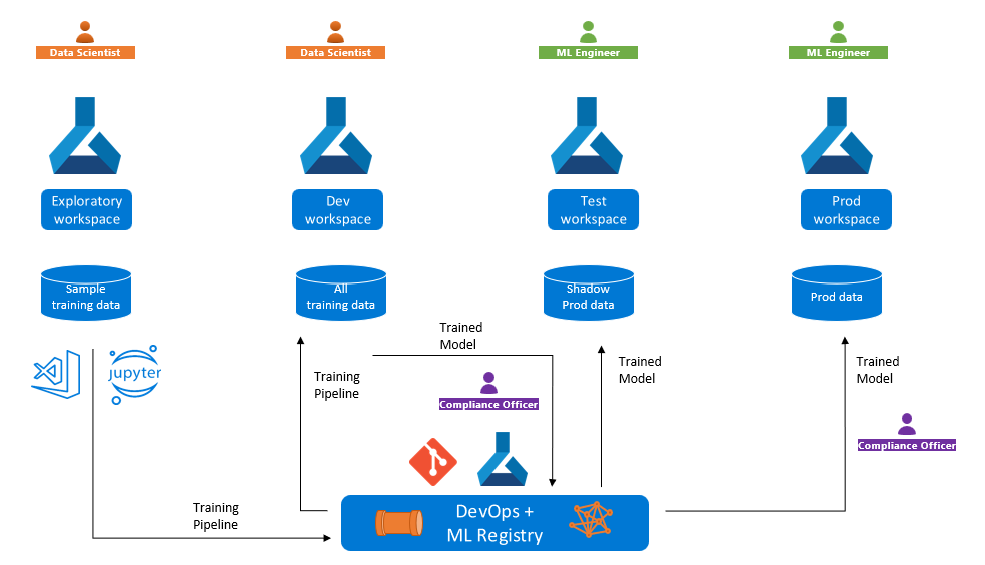
A full production deployment, however, means assembling several layers:
- Data preparation – sourcing, cleaning, labelling, and versioning datasets (in PatchCore’s case: representative “normal” images).
- Model preparation and training/fine-tuning – within a repeatable, tracked process (experiments, metrics, model registry). (Reminder: training and fine-tuning are deliberately out of scope for this article – we list them here only as part of the full cycle.)
- Multi-environment deployment (MLOps) – typically dev / test / production, with automated deployments, model quality and cost monitoring, and a safe model swap mechanism.
- Assembly according to AI Landing Zone guidelines – so that networking, identity, data, and compliance meet the organisation’s requirements, and everything can be reproduced and audited.
Why this matters for this article's conclusions
This perspective strengthens rather than undermines the earlier conclusions. Since a production inference system is embedded in an orchestration and governance layer regardless, the choice of whether an expensive GPU or a cheaper CPU sits underneath it becomes a conscious architectural decision – not a reflexive default. Azure ML or Azure Batch will orchestrate a CPU machine pool just as readily as a GPU pool; the difference goes straight to the invoice and to resource availability. That means the greatest value isn’t in the hardware itself, but in someone who can choose the right orchestration service, design the zone to best-practice standards, and assemble it into a working, cost-effective system.
If you’re planning your own inference pipeline and wondering whether your use case actually requires a GPU or just a better framework – or how to take it from a benchmark to a production-grade system – contact us. These are exactly the questions we prefer to answer with numbers, not slogans.