Imagine asking your agent to prepare a CRM follow-up after a customer call. It can reach the system, but does it know which opportunity to use, or when to ask a clarifying question?
In the early days, you had to build dedicated tools: one to find the right opportunity and another to create a new activity. Then MCP tools arrived, and all you needed were the right instructions. But what if the agent has to handle many more tasks like that? More instructions. What if some of those tasks depend on your organization’s procedures? Even more instructions. And what if several AI agents do similar tasks, each in a slightly different context?
This can quickly become an administrator’s nightmare, because a single change to one procedure may mean updating a whole list of agents. Skills can solve this by providing that guidance in one reusable place.
Note: the scenarios below are proposed designs, not built-in integrations.
Why isn’t a CRM connection enough?
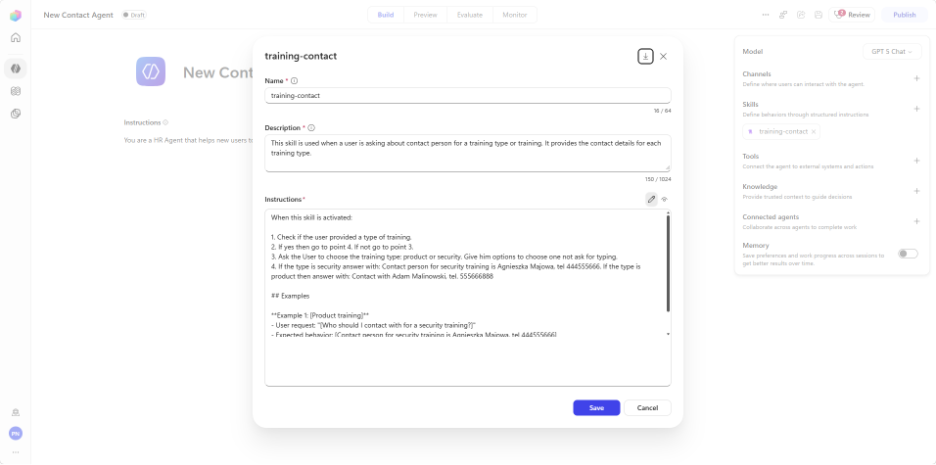
A CRM tool gives the agent access. It does not give it your follow-up procedure. Agent Skills and Business Skills both add task guidance, but their scopes differ:- Agent Skills are portable instruction packages that may include scripts. In this article, they refer to agents and workflows powered by the GitHub Copilot harness, not to every Copilot experience.
- Business Skills (preview) store shared natural-language process instructions centrally in Dataverse. They contain instructions, not executable code.
Neither type grants CRM access. Adding a skill does not connect the agent to any system.
What goes into an Agent Skill?
An Agent Skill has a Markdown definition with a name, a description and instructions, plus optional scripts, templates or references. Through progressive disclosure, the agent loads the relevant context only when it needs it, instead of carrying every procedure in its starting instructions. The result is reusable guidance for a specific task.
What belongs where?
- General instructions define behavior.
- Knowledge supplies reference information.
- Tools provide external services and actions through connectors, APIs or MCP.
- Skills add task-specific guidance.
Scenario 1: Turn a sales call into a validated follow-up
A salesperson has a call transcript but no time to turn it into a useful Dynamics 365 Sales follow-up.
Inputs: the transcript, the customer and opportunity identifiers, and your required follow-up fields.
Process:
- Use a configured CRM tool to retrieve the opportunity and confirm the match.
- Extract the proposed next steps and compare them with the required fields.
- If the customer match is ambiguous or the due date is missing, ask the salesperson.
- Show the proposed opportunity update and task, including the owner and due date.
- Require the salesperson’s approval before a configured update tool writes to Dynamics 365 Sales. If a tool fails, report the failure honestly.
Output: a reviewable follow-up.
An Agent Skill could package this procedure, including an output template, for reuse in supported agents. Alternatively, the shared field checks could live in a centrally maintained Business Skill.
When does Dataverse make sense?
Business Skills let you maintain shared process instructions in Dataverse through Power Apps. Discovery starts with metadata, and the full instructions and resources are retrieved on demand through Work IQ MCP or direct Dataverse MCP. Don’t assume every client will discover the right skill automatically. .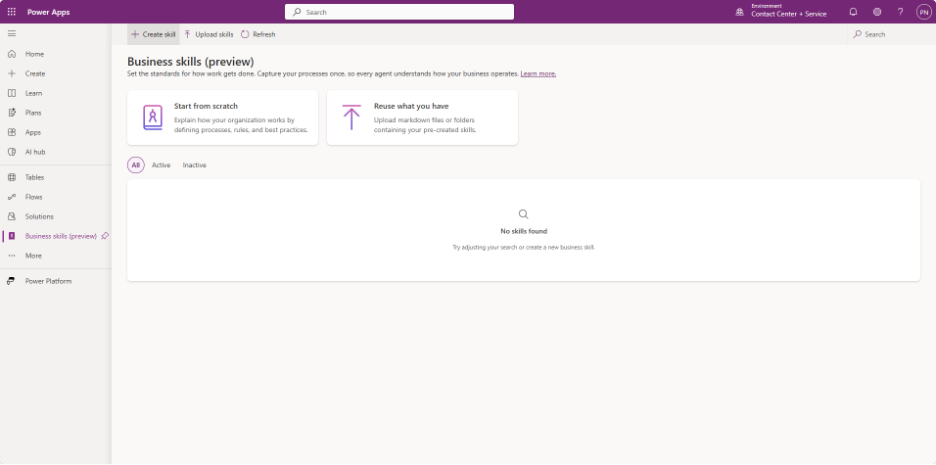
Scenario 2: Prepare a complete support escalation
A common problem is an incomplete Dynamics 365 Customer Service handoff to a specialist.
Inputs: the case identifier, the conversation history, the troubleshooting already attempted and the escalation policy.
Process:
- Retrieve the case through a configured tool.
- Check it against the policy and identify missing evidence.
- Prepare the handoff.
- A support lead confirms the severity and destination before a configured case-update or routing tool changes the record.
- If the policy doesn’t cover the situation, the agent sends the question to the lead instead of inventing a rule.
Output: an escalation packet with the case context, completed checks, evidence still needed and a suggested handoff.
A Business Skill could maintain these completeness checks centrally for several assistants, so you don’t end up with separate versions of the same procedure. The goal is a reviewable handoff, not automatic case resolution.
How do you create a Business Skill?
Start with one testable process. Define its inputs, output, tools and human decision points before you begin the setup.
1. Check your environment first. An administrator must enable Work IQ in Dataverse, and you need the appropriate permissions. Choose Work IQ MCP or direct Dataverse MCP for access. A direct Dataverse connection has its own configuration, but you don’t need it just to use Work IQ MCP.
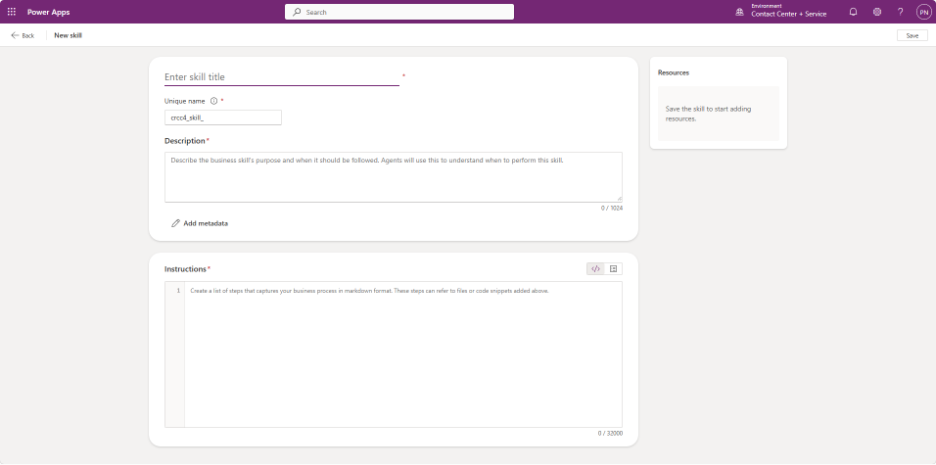
2. Create the skill. In Power Apps, go to More > Business skills (preview) > New business skill. Enter a name and a description that explains the skill’s purpose and when it should be used. Think about how someone would phrase the request: the description should make the skill’s relevance clear, not just repeat its name.
3. Write the instructions. Write them in Markdown and save. Describe the steps, inputs, expected output and validation, and add resource files if needed. Skills are active by default, so deactivate an unfinished skill while you work on it to prevent it from being discovered and used.
4. Configure access and test. Set up MCP access and the tools needed for the actual work. Instruct the agent to find the relevant Business Skills it has permission to use, retrieve their instructions and follow them. Test both a complete request and one with missing information. A skill’s existence doesn’t guarantee that it will be discovered or executed successfully.
What should you check before sharing?
Choose Agent Skills for portable task guidance in supported harness-powered agents and workflows. Choose Business Skills for centrally maintained guidance in Dataverse. Don’t assume one package can be reused unchanged across both; check its compatibility and deployment requirements.
Whichever you choose, test discovery, missing inputs, permissions and approval boundaries. Tools perform the actions, and skills don’t make outcomes deterministic.
We started with simple bots built on decision trees. Then came AI agents driven by instructions and tools. Now we’re adding a new layer: reusable guidance that tells agents when and how to handle each task.