In the era of Generative AI, the “Context Gap” has emerged as the primary barrier to true enterprise productivity. Large Language Models (LLMs) are often “stateless” by nature, possessing vast general knowledge but lacking an organic understanding of your organization’s specific rhythms, relationships, and evolving priorities.
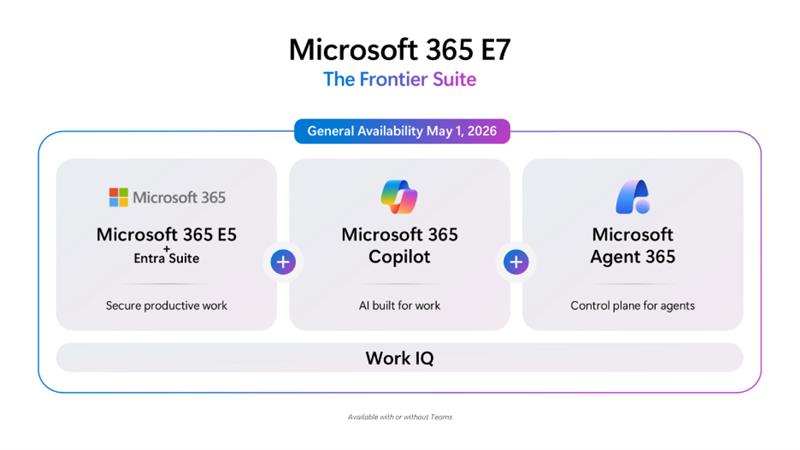
Microsoft Work IQ might be an answer for that. Work IQ is an intelligence layer that serves as the “brain” for autonomous agents that operate on your business data.
The Architectural shift – from “App-Led” to “Intelligence-Led”
Traditional enterprise software is “app-led”, ie. data lives in silos (email in Outlook, files in SharePoint, records in CRM), and the user acts as the manual bridge between them. Work IQ represents a fundamental shift toward an intelligence-led architecture. It models work as a continuous stream of signals rather than static documents.
Three-layer architecture
Work IQ operates through three tightly integrated technical layers that provide a shared context for all AI interactions:
1. Data Layer (Signals & The Work Chart)
Instead of just indexing raw text, this layer aggregates permission-aware signals from Microsoft Graph. It maps the “Work Chart” – the informal, high-velocity network of who actually works with whom, which Teams threads are active, and which documents are being co-authored in real-time.
2. Memory Layer (Contextual Continuity)
This layer introduces persistent work memory. It solves the “cold start” problem where AI begins every session with zero knowledge. It tracks two types of memory:- Explicit Memory: Facts or preferences explicitly stated by the user (e.g., "I prefer executive summaries in bullet points")
- Implicit Memory: Patterns observed by the system, such as recurring collaborators and project timelines.
3. Inference Layer (Reasoning Engine)
This is the transformational component that “connects the dots”. It can infer that a casual mention of a “pricing update” in a Teams chat is directly related to a specific opportunity in Dynamics 365 and a draft proposal in OneDrive.
Work IQ vs. Traditional RAG
While many enterprises build custom Retrieval-Augmented Generation (RAG) solutions, Work IQ operates at a significantly higher abstraction level:| Feature | Custom RAG | Microsoft Work IQ |
|---|---|---|
| Focus | Document-centric | Work-centric (Signals & Flows) |
| State | Stateless | Memory-driven (Persistent Context) |
| Search | Prompt-heavy | Inference-led (Proactive Suggestions) |
| Scope | App-specific | Cross-app Intelligence (Graph-wide) |
Semantic indexing and vectorization
At the heart of Work IQ’s ability to “understand” intent is the Semantic Index. Unlike traditional keyword search (lexical matching), which looks for exact string matches, the Semantic Index represents data as vectors with semantic meaning added on top.
Vectorization of data
Work IQ transforms documents, emails, and chat snippets into their numerical representations (vectors) in a multi-dimensional space where each dimension captures an aspect of semantic meaning.The technical standard for this similarity is often the Cosine Similarity.
This allows the system to find “onboarding process” when you search for “new hire steps,” even if the words don’t match.
Beyond Retrieval: Agentic Search
Microsoft Work IQ powers what Microsoft calls Foundry IQ Agentic Retrieval. Traditional search returns a list of links; Work IQ’s agentic search:
- Plans the query: Breaks a complex prompt into multiple search steps.
- Iteratively searches: Refines the search if initial results are insufficient.
- Reflects and Synthesizes: Validates the information against the source material to eliminate hallucinations before presenting the final answer.
This process includes reasoning over structured metadata eg. in SharePoint. An agent can now understand that a “Contract” file has a specific “Expiry Date” field, allowing for precise queries like “Show me all contracts expiring in Q3” rather than just finding the word “expiry”.
Microsoft ecosystem – Graph, Dataverse and enterprise governance
Microsoft Work IQ vs Microsoft Graph
Many people think that Work IQ is just a rename for Microsoft Graph. It’s not true. Microsoft Graph is the API and data access layer: it exposes emails, files, calendars, and user relationships in a permission-aware, developer-consumable way. Work IQ sits on top of Graph and adds the intelligence and orchestration layer: it learns work patterns, infers intent, builds memory of user and agent activity, and delivers contextual reasoning that Graph alone cannot provide. As Adam Harmetz, Vice President of Product Management, Data Science, and Tech Community at Microsoft put it, the developer-focused API access remains Microsoft Graph; Work IQ is the new term needed specifically for the “brain” of Microsoft 365 in the AI era – the layer that makes context searchable, explainable, and actionable.Work IQ, MCP and CLI
For developers and architects, the most significant evolution is the opening of Work IQ via the Model Context Protocol (MCP). MCP is an open standard often described as “USB-C for AI”. It allows AI assistants to securely talk to data and tools without custom integration work.
Through the Work IQ CLI tool, developers can ground their local terminal and IDEs in Microsoft 365 data. This allows for “Pro-Code” scenarios where a coding assistant can access project specifications from SharePoint or meeting notes from Teams to generate more relevant code.
Common CLI interactions include:
– workiq ask -q “…”: Querying organizational data directly from the terminal.
– workiq mcp: Running the WorkIQ server to provide context to an external LLM host like Claude Desktop or VS Code.
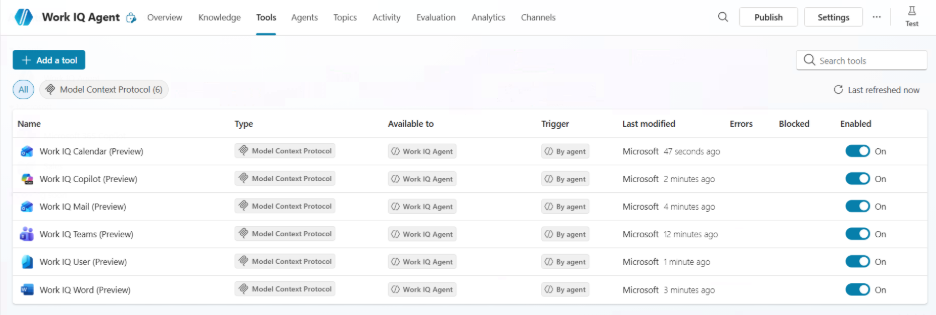
Dataverse and Work IQ
Dataverse extends Work IQ by bringing structured business data into that intelligence picture: it serves as the container for Power Apps and Dynamics 365 data, and when integrated with Work IQ, it enables agents to reason over governed enterprise data rather than just productivity signals from M365. Thanks to Work IQ, Dataverse can be transformed from a system of record into an intelligent system of action – agents don’t just retrieve data, they can understand business context and act on it.
This allows for what Microsoft calls a “Frontier Transformation” – combining all signals from the company data into intelligence. An example?
If a pricing change is discussed in a meeting transcript (Work IQ), the system can immediately identify which active sales opportunities in Dynamics 365 are impacted and surface them for review.
Conclusion
Microsoft Work IQ is the connective tissue that transforms a collection of isolated apps into a cohesive, intelligent platform that can really power agentic enterprises. By grounding AI in the “Work Chart,” leveraging semantic search, and exposing these capabilities through standards like MCP, Microsoft is building the infrastructure for a future where work is not just assisted by AI, but operated by it.